

cPanel is the control panel of your web hosting. Its home page lists all tools in groups such as Email, Files and Domains, with your account details.
The cPanel home page
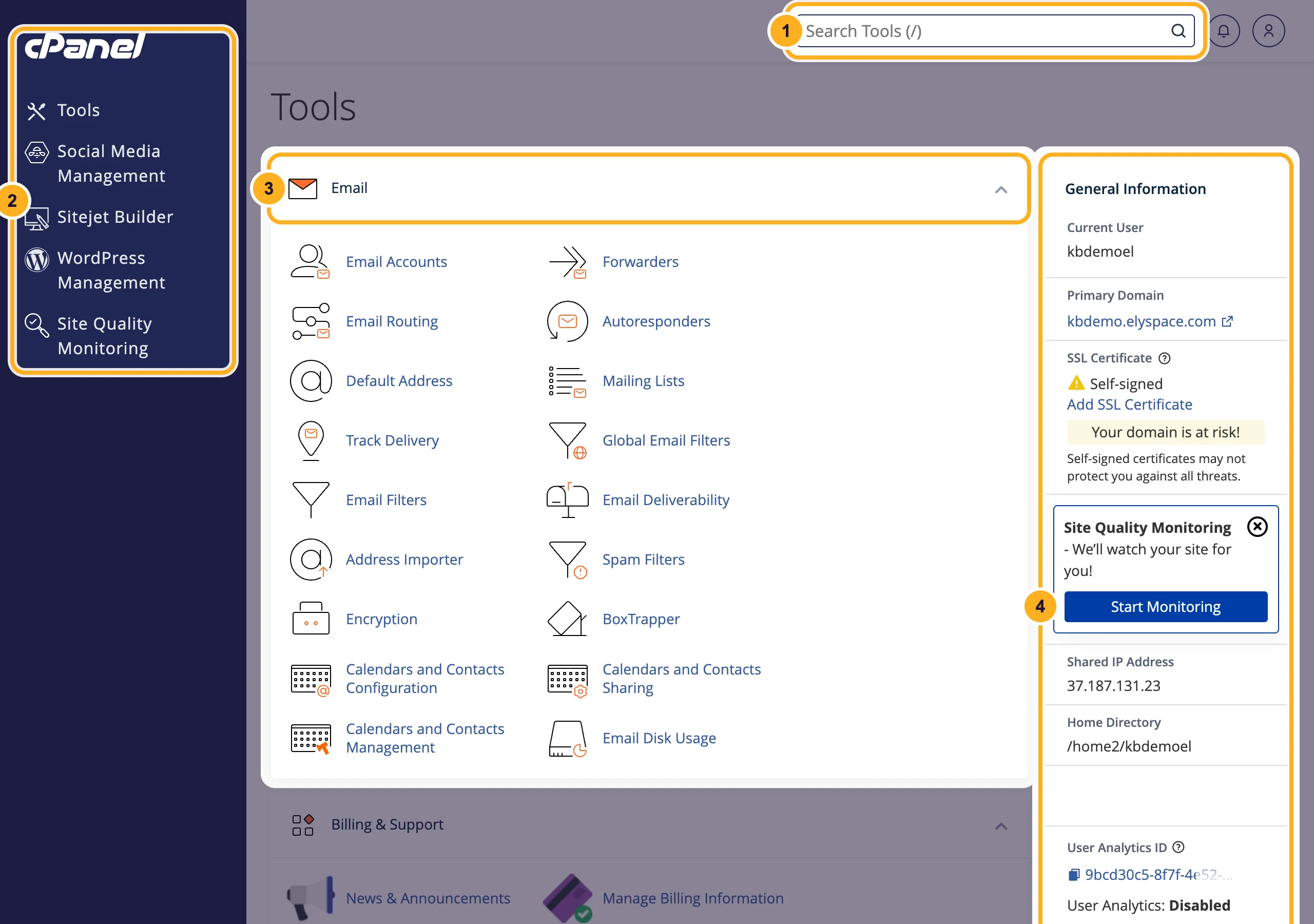
After you log in to cPanel, you see the Tools page:
- Search Tools: type a word such as
emailorphpto find a tool quickly. Pressing the/key jumps into the search box. - Left menu: Tools brings you back to this page. It also has shortcuts to WordPress Management, Sitejet Builder, Social Media Management and Site Quality Monitoring.
- Tool groups: Email, Billing & Support, Files, Databases, Domains, Metrics, Security, Software, Advanced and Preferences. Click the arrow at the right end of a group's title bar to fold it away.
- General Information: your cPanel username (Current User), Primary Domain, the SSL certificate status, the Shared IP Address and your Home Directory.
Your plan's limits: Statistics
Further down on the right, Statistics shows what you use and what your plan allows, for example 1 / 10 under Email Accounts means you have one of the ten mailboxes your plan allows. The symbol ∞ means there's no fixed limit in cPanel for that item.
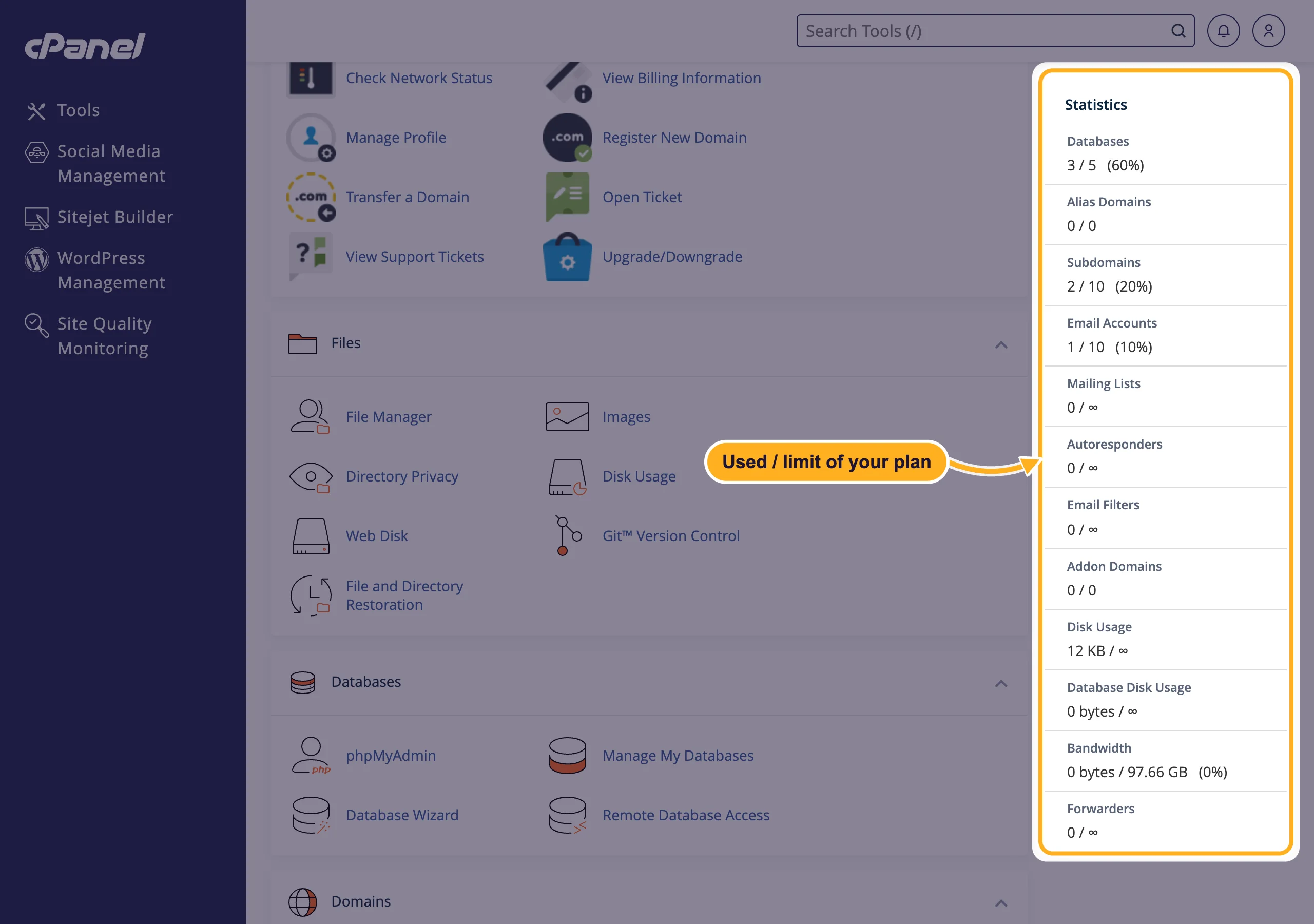
An Addon Domains or Alias Domains value of 0 / 0 means your plan hosts one website. To add more domains, upgrade your plan.
The tools you'll use most
| You want to | Tool (group) | Help |
|---|---|---|
| Upload or edit website files | File Manager (Files) | Upload files, Manage files |
| Create a mailbox such as [email protected] | Email Accounts (Email) | Create an email account |
| Install or manage WordPress | WordPress Management (Domains, and the left menu) | Install WordPress |
| Create a database | Database Wizard, Manage My Databases (Databases) | Create a MySQL database |
| Add a subdomain or another domain | Domains (Domains) | Create a subdomain |
| Forward a page or domain | Redirects (Domains) | Redirect a domain or page |
| Edit DNS records | Zone Editor (Domains) | Edit DNS records |
| Check your SSL certificate | SSL/TLS Certificates (Security) | Free SSL (AutoSSL) |
| Change the PHP version | MultiPHP Manager (Software) | Change the PHP version |
| Run a script on a schedule | Cron Jobs (Advanced) | Set up a cron job |
| Scan for malware | Imunify360, ElySpace Security (Security) | Scan with Imunify360 |
The Billing & Support group links to your ElySpace client area: invoices, tickets, the knowledgebase and Upgrade/Downgrade.
Common problems
A tool from another guide is missing
cPanel looks a little different at every host. Use Search Tools first. On our servers, WordPress is installed with WordPress Management, and PHP is set with MultiPHP Manager and MultiPHP INI Editor.
A whole group of tools has disappeared
It's probably folded away. Click the arrow at the right end of its title bar to open it again, or choose Reset Page Settings in the user menu (the person icon in the top right). See Change the cPanel language and look.
Related articles
- Log in to cPanel
- Upload files with the cPanel File Manager
- Create an email account
- Check disk space and bandwidth usage
Still stuck? Open a support ticket and we'll help.
