Add another domain in cPanel (addon domain or alias)

cPanel

0 people found this article helpful

In cPanel, open Domains and click Create A New Domain. Don't share the document root for a separate site (addon domain); share it for an alias.

Check your plan first: Starter S hosts one website, so it can't add other domains. Premium M hosts up to 5 websites and Advanced L up to 10. The Statistics panel on the cPanel home page shows your limits under Addon Domains and Alias Domains. To add domains on Starter S, upgrade your plan.

Addon domain or alias?

Addon domainAlias
What visitors seeIts own website with its own filesThe same website as your main domain
Use it forA second business, a shop, a project siteSpelling variants or other endings (yourname.net, your-name.com)
Setting in cPanelShare document root not tickedShare document root ticked

Both get their own email addresses, which you create under Email Accounts.

Before you start

The domain must be registered, and it must point to your hosting: set its nameservers to the ones on the Hosting Information tab of your service in the client area (see Find your server name, IP address and nameservers and Change your domain's nameservers). You can add the domain in cPanel first and change the nameservers right after.

Add the domain

  1. Log in to cPanel and click Domains in the Domains section.

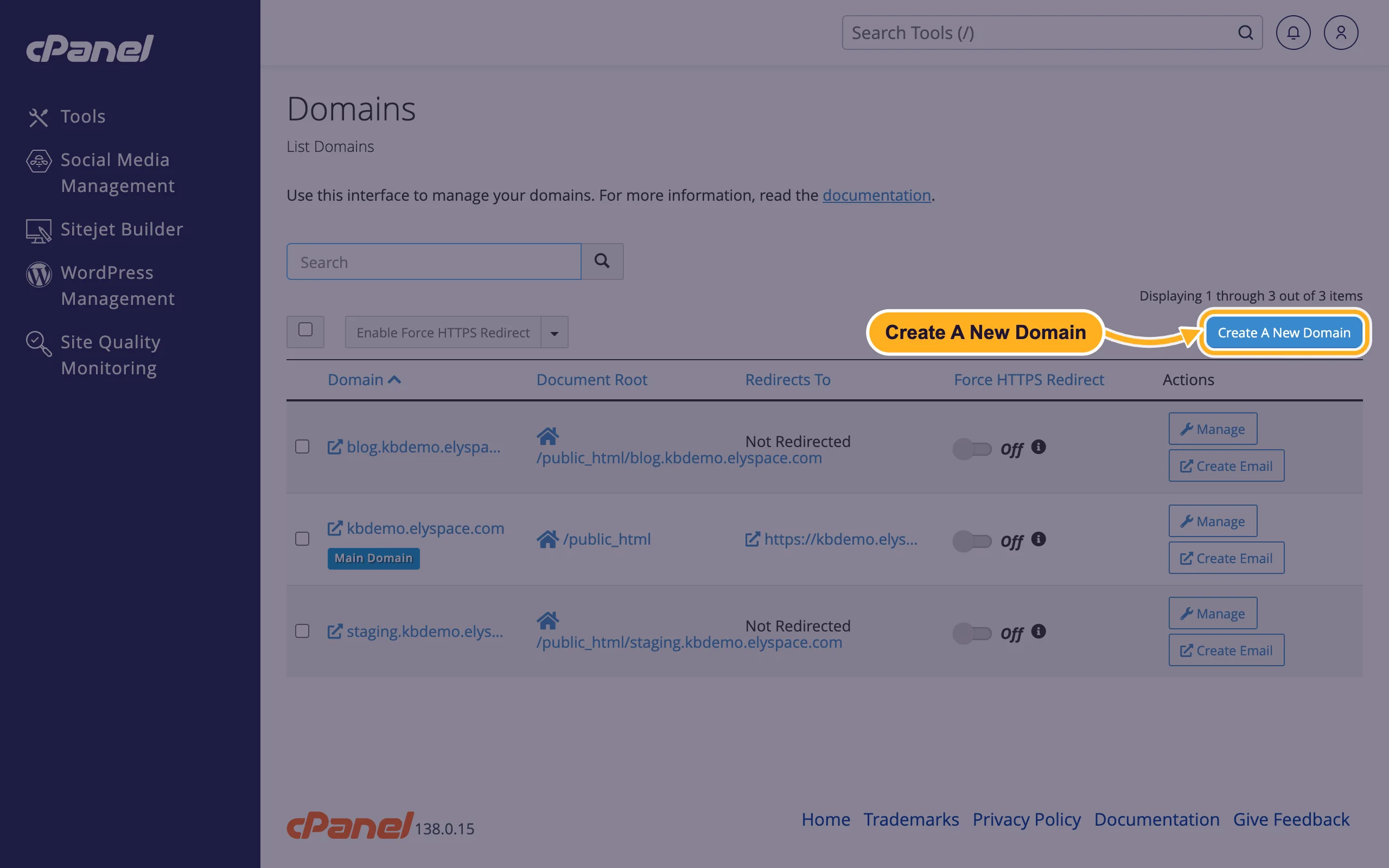
  2. Click Create A New Domain.

    cPanel Domains page with the Create A New Domain button
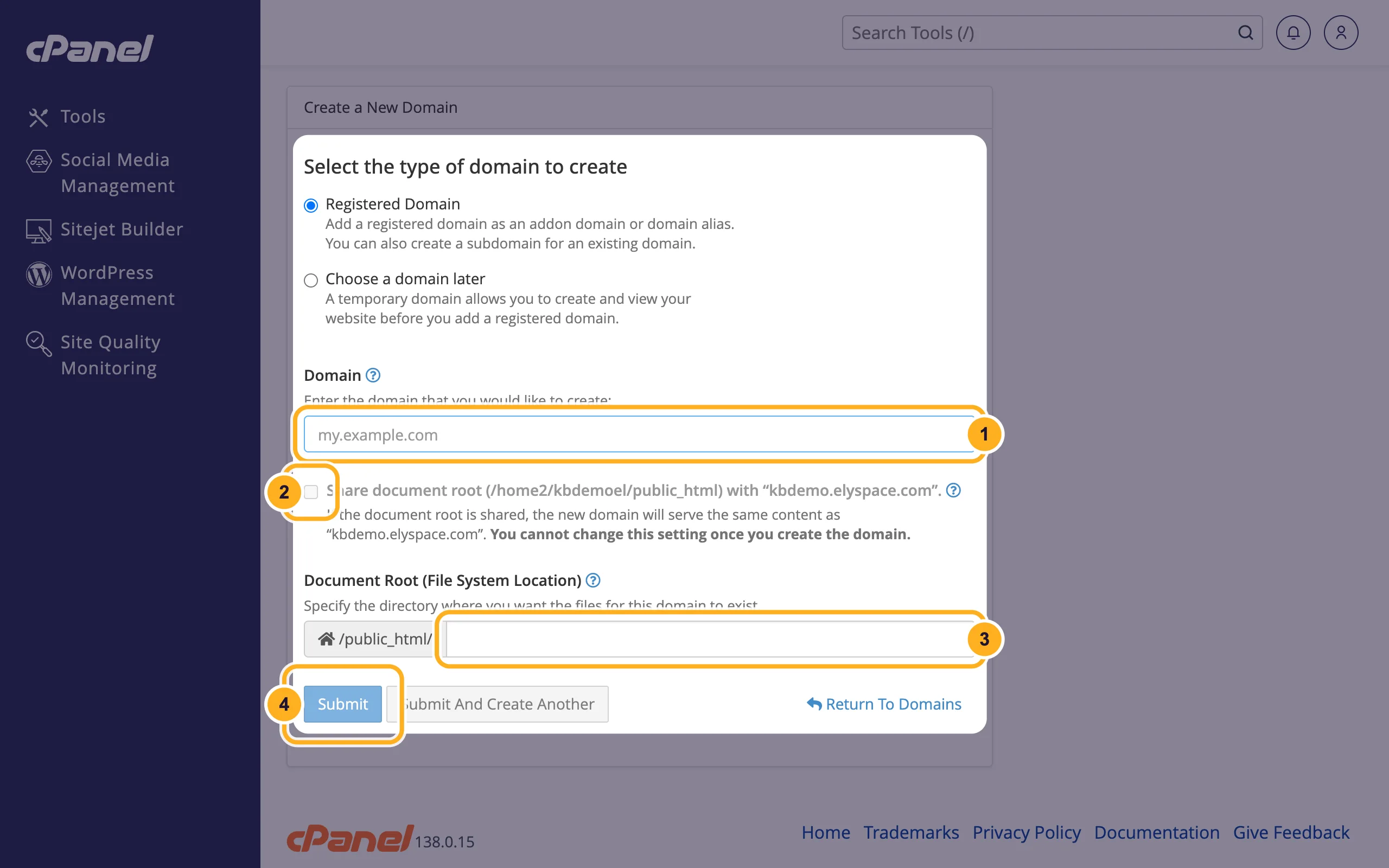
  3. Leave Registered Domain selected and fill in the form:

    1. Domain: the new domain without www, for example yourname.net.
    2. Share document root: leave it unticked for an addon domain with its own website. Tick it for an alias that shows your main site. You can't change this setting later.
    3. Document Root (File System Location): for an addon domain, cPanel fills in a folder named after the domain inside public_html. That's where you upload the new site's files. You can keep it.
    4. Click Submit.
    cPanel Create a New Domain form with the Domain field, the Share document root option, the Document Root field and the Submit button

The new domain then appears in the list on the Domains page. Upload the website into its document root with the File Manager, or install WordPress on it with WordPress Management.

Once the domain points to us, cPanel tries to get a free SSL certificate for it automatically. See Free SSL: check and fix your certificate.

Remove a domain

On the Domains page, click Manage next to the domain, then Remove Domain. cPanel removes the domain from your account but keeps the files in its document root. Delete them in File Manager if you no longer need them.

Common problems

"You have reached the maximum number of domains for this account"

Your plan doesn't allow more domains. This is what you see on Starter S, or when you've used all domains of your plan. Upgrade your plan or remove a domain you don't use.
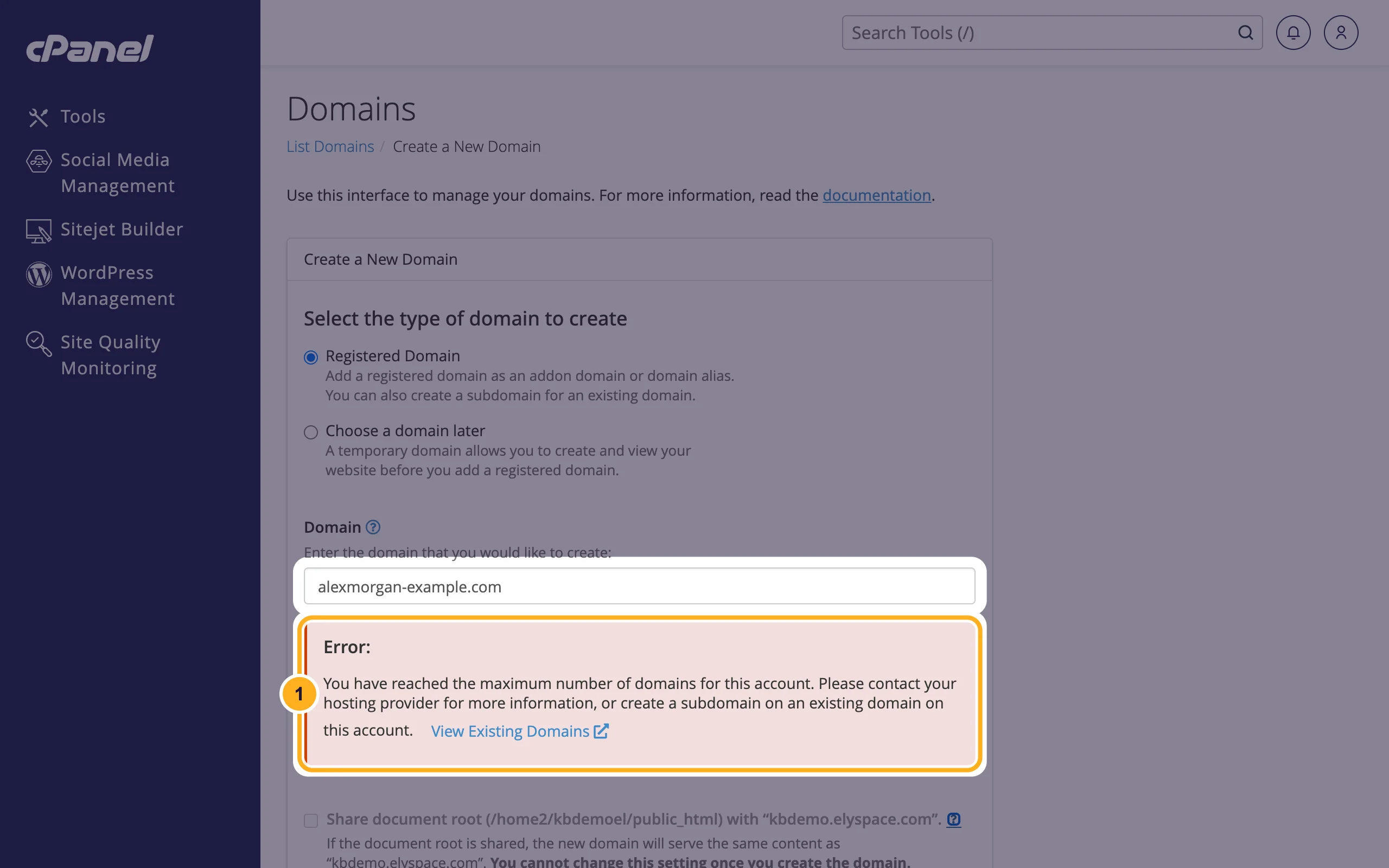
cPanel error message: You have reached the maximum number of domains for this account

The new domain shows an error or someone else's page

The domain doesn't point to your hosting yet. Check its nameservers. After a nameserver change, it can take several hours until every network sees it.

The new domain shows your main website

It was added with Share document root ticked, as an alias. You can't switch it. Remove the domain and add it again without the tick.

Related articles

Still stuck? Open a support ticket and we'll help.


Was this answer helpful?

2FA 301 redirect 3D Secure 404 page 500 error 550 error A record accept quote access log account credit account details account password Account Preferences account security add funds addon domain address importer affiliate program AI assistant AlmaLinux 9 Android email Apache Apache virtual host API token Apple Mail Ask AI auth code authenticator app auto-renew automatic payment automatic updates autoresponder AutoSSL bandwidth billing address billing contact billing section block editor block IP bounce bounce message BoxTrapper build a WordPress website bulk email accounts business email buy domain buy hosting buy SSL certificate CalDAV calendar sync callback can't log in cancel hosting cancellation card declined CardDAV catch-all Certbot change domain WordPress change email change nameserver change package change password change payment checklist checkout choose a plan client accounts client area clone WordPress cloud server coming soon page commission company name confirmation link contact contact form Contact Information contacts control panel cPanel cPanel API cPanel contact email cPanel DNS cPanel domains cPanel email cPanel install cPanel language cPanel layout cPanel login cPanel password cPanel SSL cPanel update cPanel users create cPanel account create mailbox credit card cron cron job CRT key CA bundle CSF firewall CSV import currency custom error page Custom Nameservers custom offer dashboard data center database password database privileges database user Database Wizard date.timezone DDNS deceptive site ahead default address delete database delete old emails deny access deploy deposit device email settings Directory Privacy disk space disk usage DKIM DMARC DNS cache DNS explained DNS Records DNS Zone Management document root domain alias domain grace period Domain Hosting Domain Management domain name domain renewal domain transfer downgrade download invoice due date dynamic DNS ElySpace email account email account exists email backup email client email delivery email disk usage email filters email forwarder email history email hosting email login email migration email password email ports email preferences email quota email routing email signature email test email verification EPP code error error log error pages EV SSL expired domain expiry expiry date export database export emails fake email faster support feedback File Manager file permissions firewall first website flush DNS folder force HTTPS forgot password form email not received forward email free migration free SSL FTP account's password FTP password Galaxy email setup getting started Git GitHub Gmail Gmail app GoDaddy good ticket Google malware warning Google sign-in Google Workspace GST number Gzip compression hacked website hacked WordPress hardening help help center home server hosting hosting addons hosting glossary hosting location hosting plan Hosting Service hosting terms hosting tools hosting types hostname hostname SSL hostnamectl hotlink protection HOW TO ADD NAME SERVERS TO MY DOMAIN NAME How to create additional FTP accounts in cPanel How to create FTP accounts in cPanel How to setup name-servers for a domain htaccess htaccess redirect HTTP to HTTPS image theft IMAP IMAP settings IMAP SMTP settings import emails import SQL Imunify360 index.php virus INR install plugin install SSL certificate install WordPress instant answers invite user invoice invoice details invoice emails invoice PDF invoices IP address IP Blocker iPad iPhone email knowledgebase language large database leech protection LEMP Let's Encrypt LFD linked accounts LiteSpeed Cache live chat locked out log out login login email login problem lost email Mac Mac email mail rules mailbox mailbox check mailbox full mailbox size mailing list Mailman maintenance maintenance mode malware removal malware scan manage services mass payment max_execution_time members area memory_limit menu migrate WordPress migration request migration ticket mobile webmail money-back guarantee move email move website move WordPress site MultiPHP INI Editor MultiPHP Manager multiple accounts multiple websites MX record MX records my domains MySQL MySQL database MySQL user mysqldump nameserver Nameservers network drive new account new order newsletter Nginx Node.js notifications npm nvm open ticket Optimize Website or delete order order email out of office outage Outlook Outlook app Outlook IMAP Outlook mobile Outlook password prompt OX App Suite OX webmail page speed password protect pay all pay invoice payment payment details payment failed payment method payment methods PayPal permalinks permissions phishing phone support PHP errors PHP timezone PHP version PHP-FPM php.ini PHPMailer phpMyAdmin plugin updates point domain print invoice printer SMTP product addons products professional email profile public_html publish a post quick start quota quote quotes rating Raw Access raw access logs reading settings redemption period redirect referral link refund register register domain remove user renew domain renewal repair database reseller hosting reset admin password reset password resource usage restore WordPress revoke access revoke privileges root login Roundcube Roundcube export Roundcube identities Roundcube signature rsync backup Samsung Email scam scan to email scheduled task search Search Console self-hosted WordPress send and receive send as server IP address server location server security server status service details services session setup setup domain i setup domain name shared passwords shared vs VPS sign up single sign-on site address Sitejet Builder SMTP SMTP settings spam spam filter SpamAssassin SPF SSH SSH hardening SSH key SSL certificate static front page strong password subaccount subdomain suggestions support ticket support ticket tips support tickets suspension switch account tar test site Thunderbird ticket reply ticket status track delivery transfer website troubleshooting two-factor authentication UAPI Ubuntu Ubuntu 24.04 UFW unpaid invoice unsubscribe unzip upcp upgrade hosting UPI upload files upload_max_filesize URL forwarding user management User Manager username vacation reply VAT ID verify email Web Disk web hosting web hosting basics web server WebDAV webmail webmail From address webmail on phone webmail password website builder website email website migration website not loading Website Performance website security welcome email WhatsApp WhatsApp support whitelist WHM wildcard SSL WordPress 404 WordPress backup WordPress caching WordPress critical error WordPress email WordPress errors WordPress homepage WordPress hosting WordPress login WordPress malware WordPress Management WordPress menu WordPress offline WordPress pages WordPress password WordPress plugins WordPress post WordPress security WordPress SMTP WordPress speed WordPress staging WordPress themes WordPress transfer WordPress update WordPress URL WordPress.org vs WordPress.com WP Mail SMTP wp-admin wp-admin login wp-cron zip Zone Editor zone templates