

Every domain on your ElySpace hosting gets a free SSL certificate from AutoSSL. Check its status in cPanel under SSL/TLS Certificates > Status.
AutoSSL issues and renews the certificates automatically. It only needs one thing from you: the domain must point to your ElySpace hosting, so the certificate authority can confirm that the domain is yours.
Check the certificate status
Log in to cPanel (see Log in to cPanel from the client area). Type
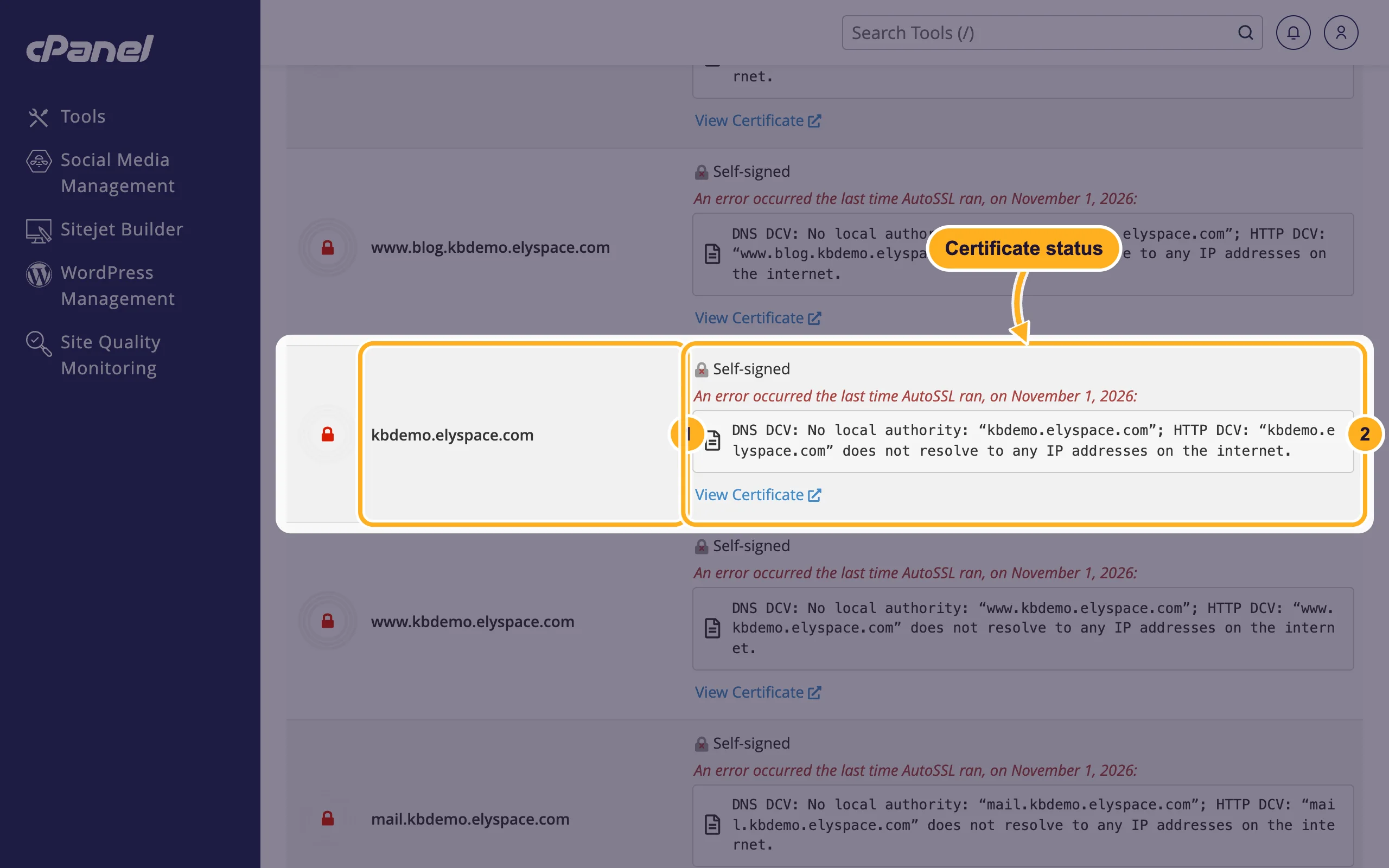
SSLin the Search Tools box at the top and open SSL/TLS Certificates, then click the Status tab.Find your domain in the list:
- The domain. The www version, mail and the cPanel service addresses (such as webmail) have rows of their own.
- Certificate Status: what the domain has now, and the result of the last AutoSSL run.
What the status means
| Status | What it means | What to do |
|---|---|---|
| Green lock with an AutoSSL certificate and its expiry date | The domain has a valid free certificate. AutoSSL renews it before it expires. | Nothing. |
| Self-signed or unsecured, with An error occurred the last time AutoSSL ran | AutoSSL could not get a certificate. Browsers show a security warning. | Read the message below the status and see the next section. |
| Expiring Soon or Expired | The certificate is running out or has run out. | For AutoSSL certificates: fix the error shown. For a certificate you bought: install the renewed one (see Install an SSL certificate you bought). |
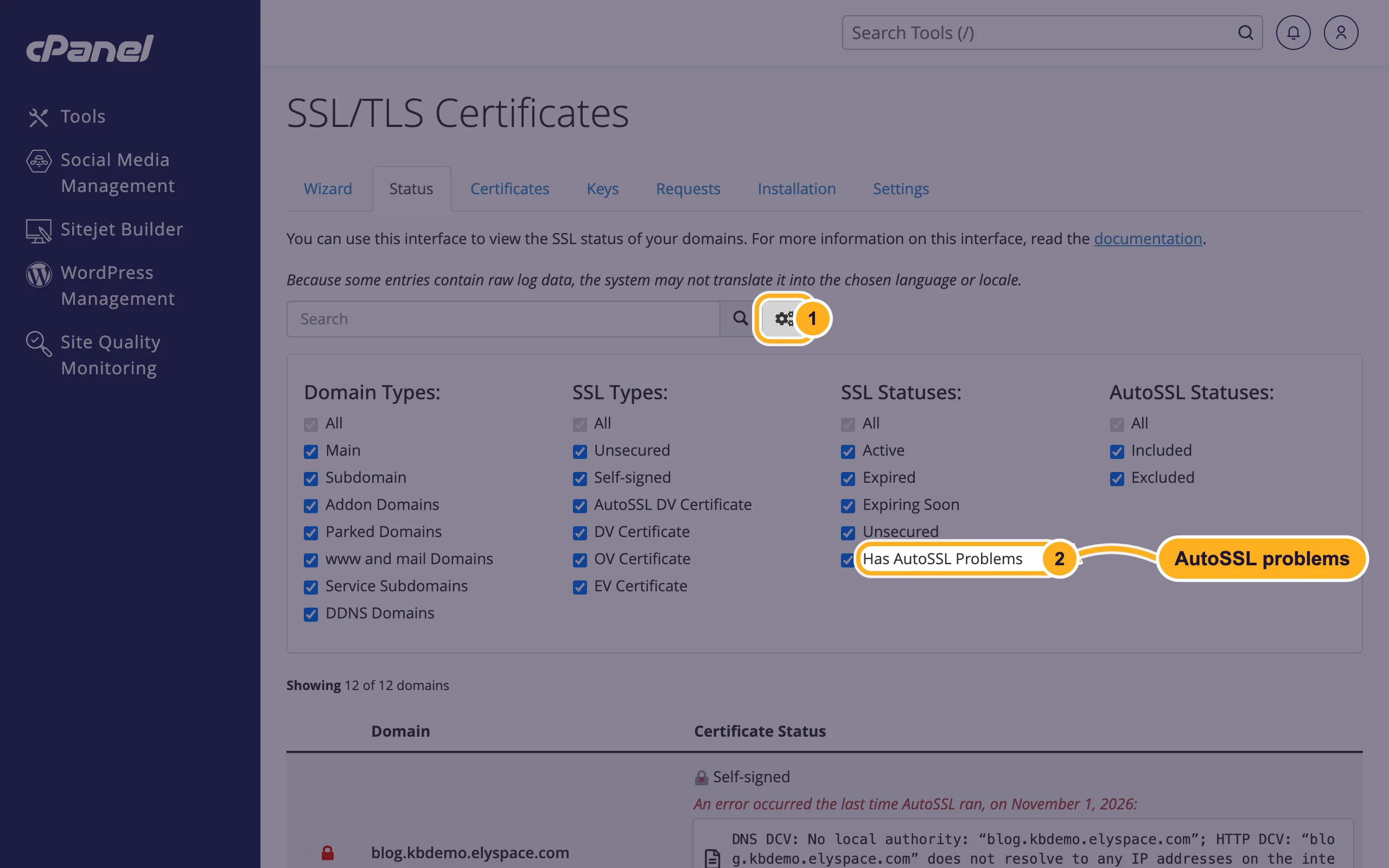
With many domains, click the gear icon next to the search box and use the filters, for example Has AutoSSL Problems, to see only the domains that need attention.
Fix AutoSSL errors
"does not resolve to any IP addresses on the internet" or "No local authority"
The domain (or that subdomain) doesn't point to your ElySpace hosting yet. Use our nameservers, or set an A record to your server's IP address: Find your server name, IP address and nameservers and Change your domain's nameservers. For a subdomain such as www, check that its DNS record exists (see Edit DNS records in cPanel (A, CNAME, TXT)).
The domain points to another IP address
An old A record or a proxy service sends the domain elsewhere. Correct the A record. If you use Cloudflare's proxy (orange cloud), AutoSSL checks may fail; set the record to DNS only until the certificate is issued, or use Cloudflare's own certificate.
The domain was changed only a short time ago
DNS changes take time to spread, often a few hours, sometimes up to a day or two. AutoSSL tries again on its own when it next runs on the server. The status page shows the date of the last run.
Something blocks the check file
AutoSSL places a check file under /.well-known/ on your site. Rules in .htaccess that block or redirect that folder, or a site-wide password, can make the check fail. Remove the rule and wait for the next run.
Need it faster?
There is no button in your cPanel to start AutoSSL yourself. Once your domain points to us and the error is fixed, open a ticket in cPanel Support and we'll run AutoSSL for your account.
Related articles
- Redirect HTTP to HTTPS
- Install an SSL certificate you bought
- Clear your DNS cache (Windows, macOS, browsers)
Still stuck? Open a support ticket and we'll help.
