

Send all visitors to the secure https:// version of your site with the Force HTTPS Redirect switch in cPanel's Domains page, or with a rule in .htaccess.
Option 1: the Force HTTPS Redirect switch
Log in to cPanel (see Log in to cPanel from the client area) and open Domains.
In the list of domains:
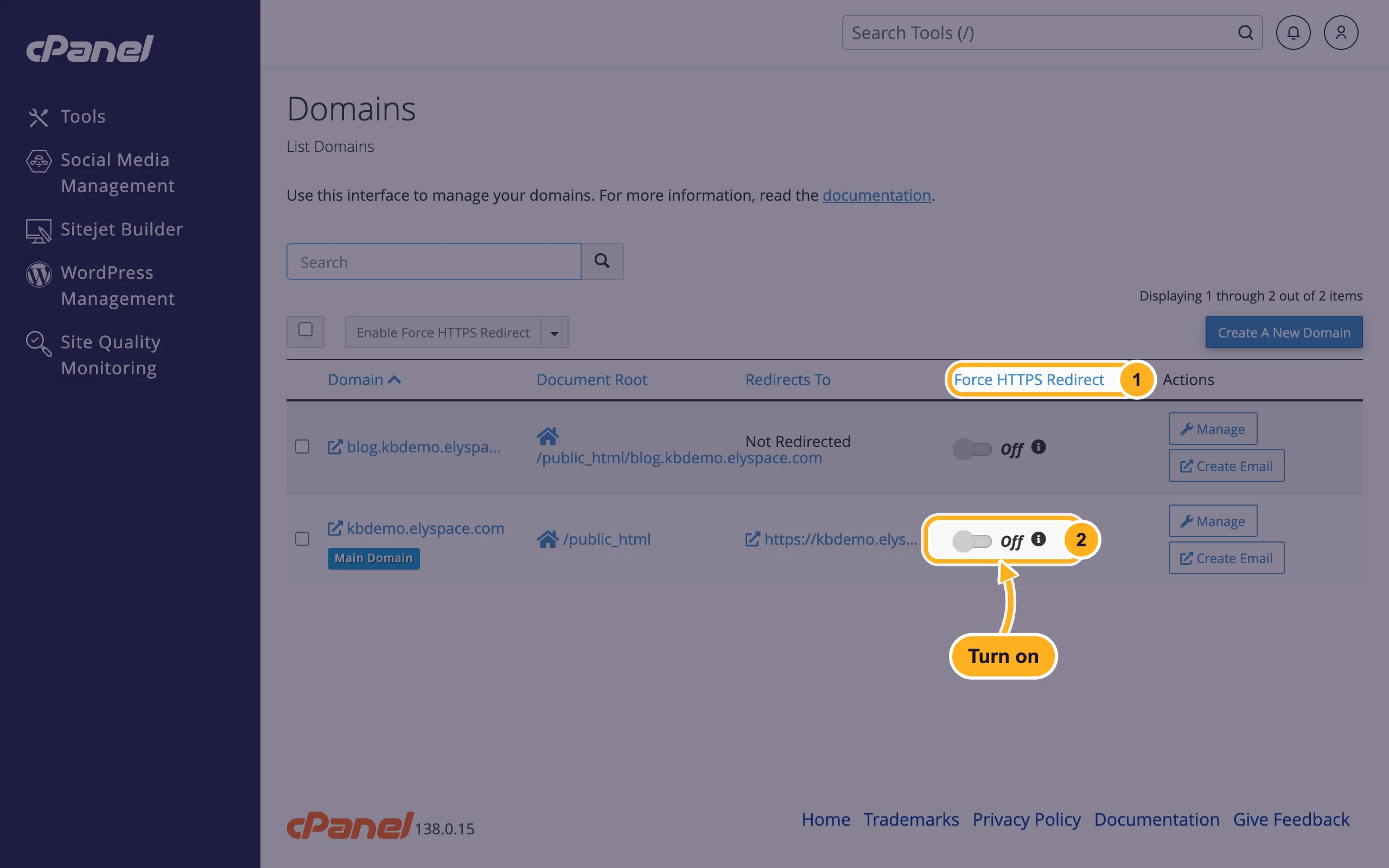
- The Force HTTPS Redirect column shows the switch for each domain.
- Turn the switch on for your domain. It shows On when the redirect is active.
Open
http://yourdomain.com. The browser should switch tohttps://by itself.
The switch can only be turned on once the domain has a valid certificate. To change several domains at once, tick them and use Enable Force HTTPS Redirect above the list.
Option 2: a rule in .htaccess
Use this if you want the redirect inside your site's files, or for one folder only.
In cPanel's File Manager, click Settings at the top right, tick Show Hidden Files (dotfiles) and click Save.
Open
public_html(or your domain's folder), select.htaccessand click Edit. If there's no.htaccessfile, create one with + File.Add these lines at the very top of the file and click Save Changes:
RewriteEngine On
RewriteCond %{HTTPS} off
RewriteRule ^(.*)$ https://%{HTTP_HOST}%{REQUEST_URI} [L,R=301]
The rule keeps the rest of the address, so http://yourdomain.com/contact goes to https://yourdomain.com/contact. R=301 tells search engines the move is permanent.
To also send everyone to the www version, use this instead (replace yourdomain\.com and yourdomain.com with your domain):
RewriteEngine On
RewriteCond %{HTTPS} off [OR]
RewriteCond %{HTTP_HOST} ^yourdomain\.com$ [NC]
RewriteRule ^(.*)$ https://www.yourdomain.com/$1 [L,R=301]
Keep a copy of the old file before you edit it (see Manage files: edit, move, zip and set permissions).
WordPress: update the site address
In WordPress, go to Settings > General and make sure WordPress Address (URL) and Site Address (URL) start with https://. Click Save Changes. In cPanel's WordPress Management, the SSL/TLS label on your site's card shows whether the redirect to HTTPS is on and whether the certificate is valid.
Common problems
"Too many redirects"
Two redirects are fighting, for example the switch and an older rule in .htaccess, or a plugin. Use only one method. If you use Cloudflare, set its SSL mode to Full instead of Flexible.
The lock icon shows a warning on some pages
The page loads images or scripts over http:// ("mixed content"). Change those links to https://. In WordPress, this often means updating old image addresses in posts or theme settings.
The switch can't be turned on
The domain doesn't have a valid certificate yet. Fix that first: Free SSL: check and fix your certificate (AutoSSL).
Related articles
- Free SSL: check and fix your certificate (AutoSSL)
- Redirect a domain or page
- Fix posts and pages that show 404 (permalinks)
Still stuck? Open a support ticket and we'll help.
