

Hotlink protection in cPanel stops other websites from showing your images directly from your server, which uses your bandwidth. Turn it on in two minutes.
"Hotlinking" means another site embeds a picture with a link to your server. Your server delivers the file every time their page is opened, and your plan's bandwidth pays for it. With protection on, those requests are blocked, while your own pages keep working.
Turn on hotlink protection
Log in to cPanel (see Log in to cPanel from the client area). Type
Hotlinkin the Search Tools box at the top and open Hotlink Protection.Set it up:
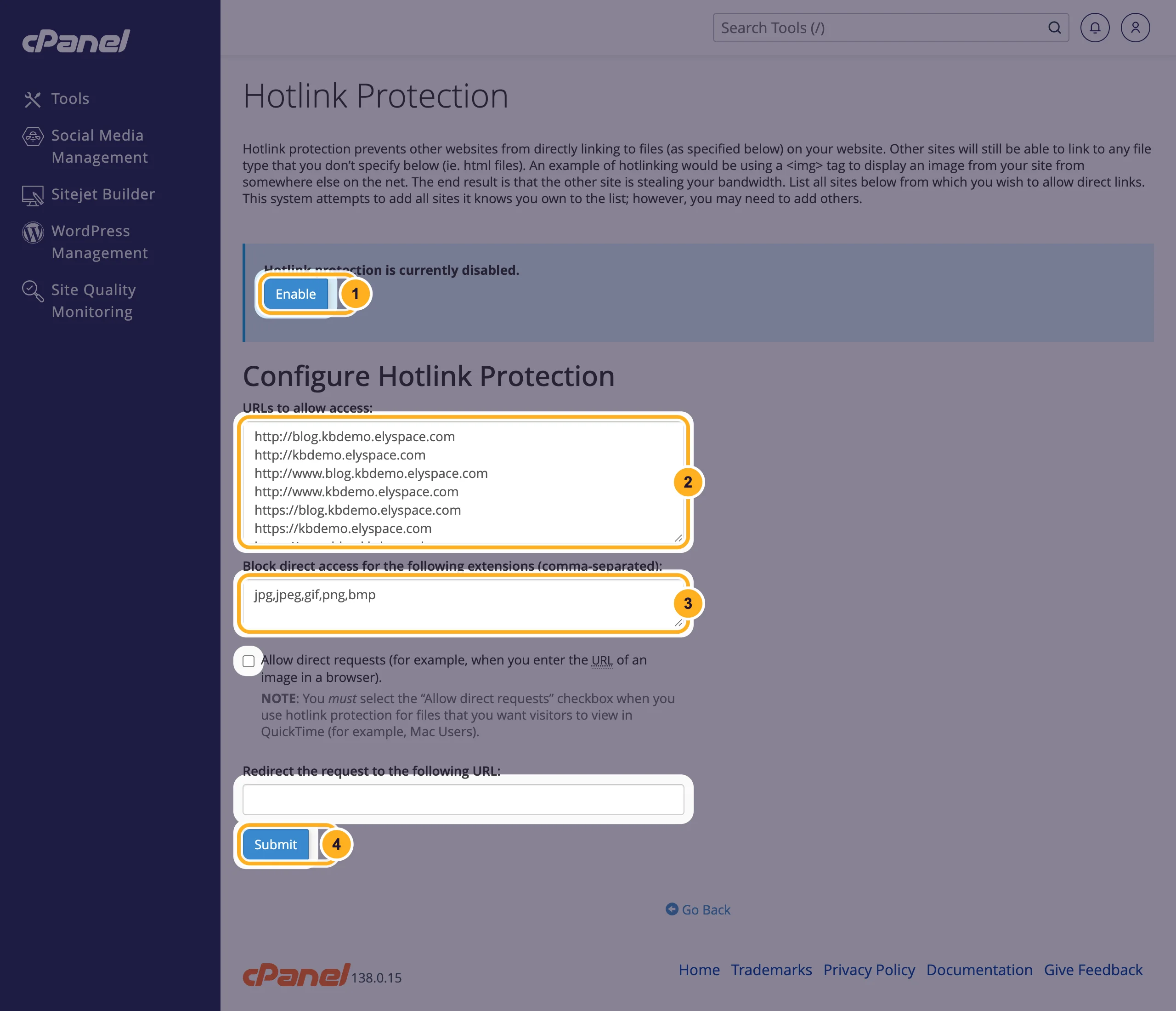
- The page says Hotlink protection is currently disabled. Click Enable.
- URLs to allow access: sites that may show your files. cPanel fills in your own domains. Add any other domain of yours that uses these files, one per line.
- Block direct access for the following extensions (comma-separated): the file types to protect, by default
jpg,jpeg,gif,png,bmp. Addwebpif your site uses WebP images, for examplejpg,jpeg,gif,png,bmp,webp. - Click Submit to save the settings.
Two more options on the page:
- Allow direct requests: lets people open an image by typing its address into the browser. Tick it if you share direct links to your files.
- Redirect the request to the following URL: instead of a blocked image, other sites get this address, for example a small image with your logo.
For WordPress sites
cPanel's WordPress Management has a Hotlink protection switch on each site's card. Its settings icon lets you set Trusted domains and Protected file extensions for that site. Use either the cPanel page or the switch, not both, so the rules don't get in each other's way.
Turn it off
Open Hotlink Protection again and click Disable.
Common problems
Your own images no longer show
The address your site uses isn't in URLs to allow access, for example a second domain, a subdomain or the www version. Add it and click Submit.
Images may not show in image search or link previews
Search engines and social networks that display your images from your server count as other sites. If you want your images in their results, add their domains to the allowed list, or leave the protection off.
Other sites still show your images
They may have copied the files to their own server. Hotlink protection only stops links to your server. Clear your browser cache before testing, because your browser may still show a saved copy.
Related articles
Still stuck? Open a support ticket and we'll help.
