

If your emails land in spam, set up SPF, DKIM and DMARC for your domain. cPanel's Email Deliverability tool checks all three and shows the correct records.
What the three records do
- SPF lists the servers that may send mail for your domain.
- DKIM adds a digital signature to every message, so the receiver can check that it really comes from your domain and wasn't changed.
- DMARC tells receivers what to do with mail that fails SPF and DKIM. It only works when SPF and DKIM are correct.
Gmail, Outlook.com and Yahoo expect these records. Without them, your mail is far more likely to go to spam or be rejected.
Check your domain
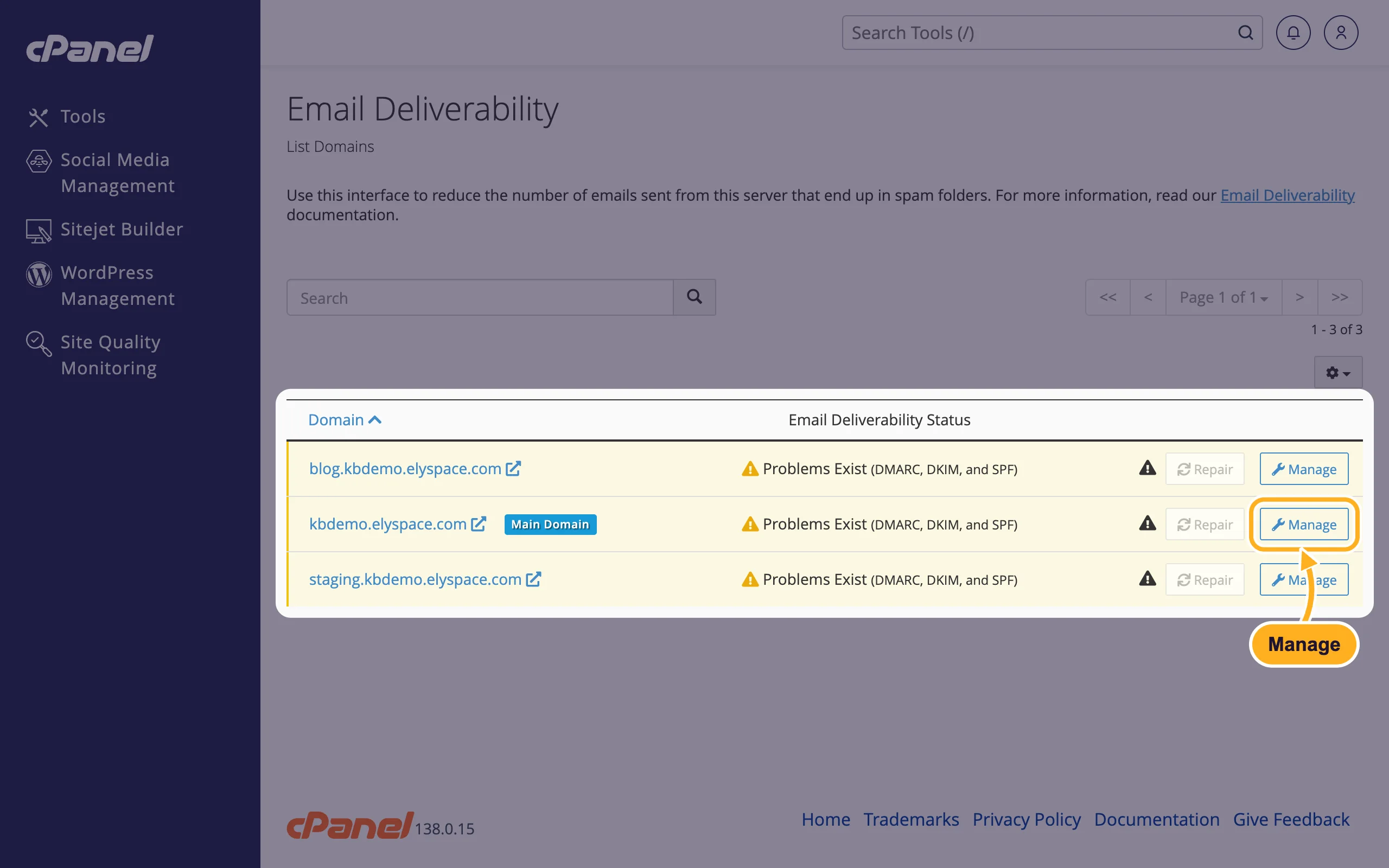
Log in to cPanel (see Log in to cPanel from the client area) and click Email Deliverability in the Email section.
The list shows each domain with its Email Deliverability Status. Problems Exist names the records that are missing or wrong. Click Manage next to the domain to see the details.
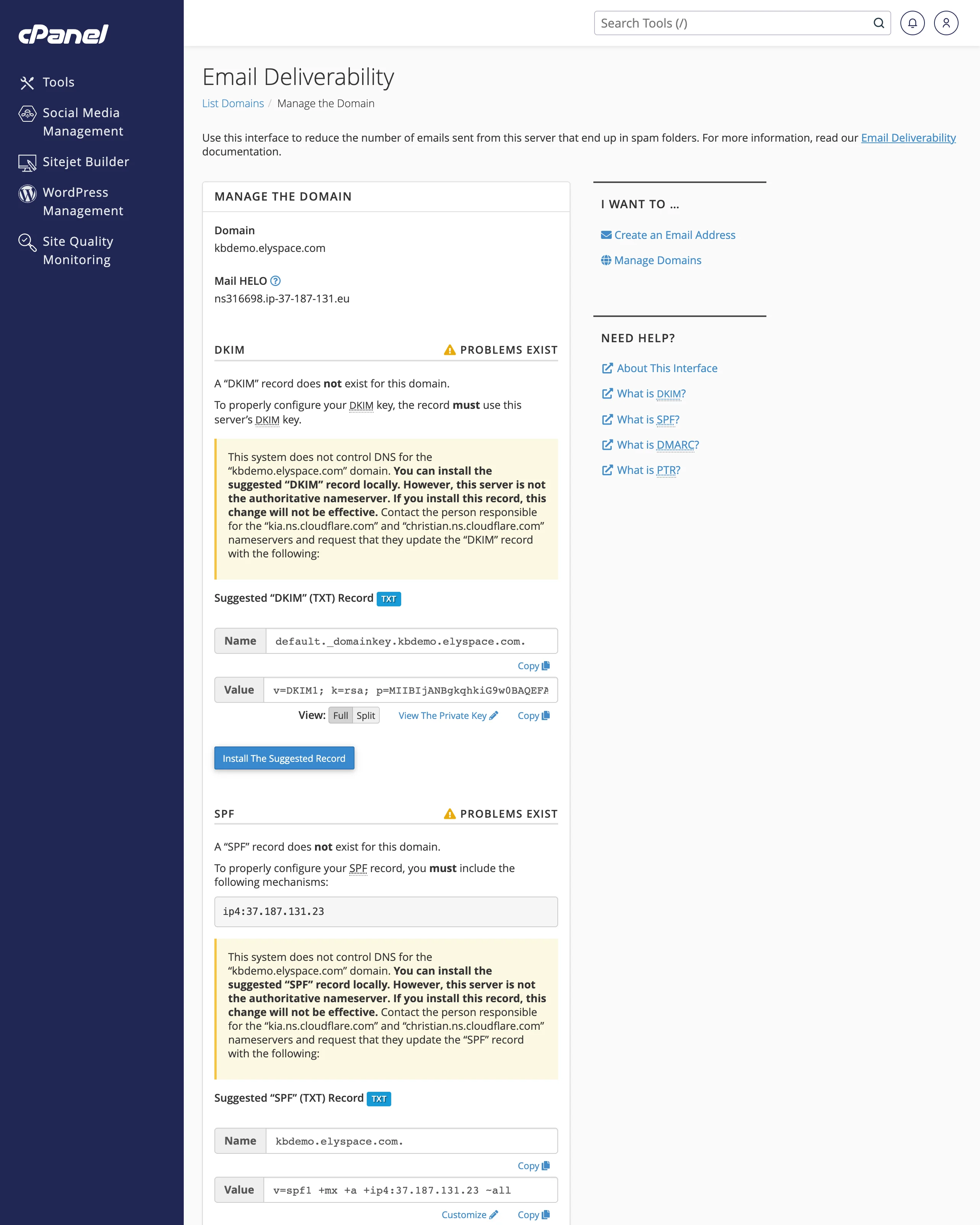
The page shows a section for DKIM, SPF, DMARC and Reverse DNS (PTR). For each record with problems, cPanel shows the suggested record with its Name and Value. Reverse DNS is set up by us on the server.
Fix it: your domain uses our nameservers
If your domain uses the ElySpace nameservers (see Find your server name, IP address and nameservers), cPanel can add the records for you:
- Click Install The Suggested Record in each section with problems, or
- click Repair next to the domain in the list to fix all records at once.
Wait a few minutes and open Email Deliverability again. The problems should be gone.
Fix it: your DNS is somewhere else
If your domain's DNS is managed elsewhere (for example Cloudflare or your domain registrar), cPanel shows a yellow note that starts with "This system does not control DNS for" your domain and names the nameservers in charge. Records installed in cPanel have no effect then. Add them where your DNS is managed:
In each section, use Copy next to Name and Value.
At your DNS provider, add a TXT record with that name and value. Typical records look like this:
Record Name Value (example) SPF yourdomain.comv=spf1 +mx +a +ip4:37.187.131.23 ~allDKIM default._domainkey.yourdomain.comthe long v=DKIM1; k=rsa; p=…key from cPanelDMARC _dmarc.yourdomain.comv=DMARC1; p=none;Always copy the values from your own cPanel: the IP address and the DKIM key differ per server.
Wait for the DNS change to spread (often minutes, sometimes a few hours) and check again in Email Deliverability.
v=spf1. If you already have one (for example for Google Workspace or a newsletter service), add the server's part to it instead of creating a second record, for example v=spf1 +mx +a +ip4:37.187.131.23 include:_spf.google.com ~all.If you use Google Workspace
When Google Workspace handles your mail (see Use Google Workspace with your domain), the DKIM key must come from Google:
In the Google Admin console, go to Apps, Google Workspace, Gmail, Authenticate email.
Select your domain, click Generate new record (2048-bit if your DNS accepts it) and copy the TXT record name (usually
google._domainkey) and value.Add it as a TXT record in cPanel's Zone Editor (see Edit DNS records in cPanel (A, CNAME, TXT)) or at your DNS provider.
Back in the Admin console, click Start authentication. Google says it can take up to 48 hours before DKIM starts working.
SPF must then include Google (include:_spf.google.com), and DMARC works as described above.
Common problems
Mail still goes to spam with all records valid
Content matters too: avoid sending only an image or a link, add a plain text part, and don't send bulk newsletters from your mailbox. Ask recipients to mark your mail as "not spam" and add you to their contacts.
Mail sent by your website (contact forms, WooCommerce) goes to spam
Make the website send from an address on your own domain, ideally through SMTP with a real mailbox, so SPF and DKIM match.
DMARC p=none, quarantine or reject?
p=none only reports and never blocks mail, which is the safe start. Once SPF and DKIM have been valid for a while, you can make the policy stricter.
Related articles
- Use Google Workspace with your domain
- Edit DNS records in cPanel (A, CNAME, TXT)
- Turn on spam filters
- Email server settings and ports (IMAP, POP3, SMTP)
Still stuck? Open a support ticket and we'll help.
