

To get your domain's email in Google Workspace (Gmail), point the MX record to Google in cPanel's Zone Editor and set Email Routing to Remote Mail Exchanger.
1. Point the MX record to Google
Log in to cPanel (see Log in to cPanel from the client area) and open Zone Editor in the Domains section.
Click Manage next to your domain, click MX in the filter to show only MX records, and delete the existing MX record that points to your own domain (Delete in its row).
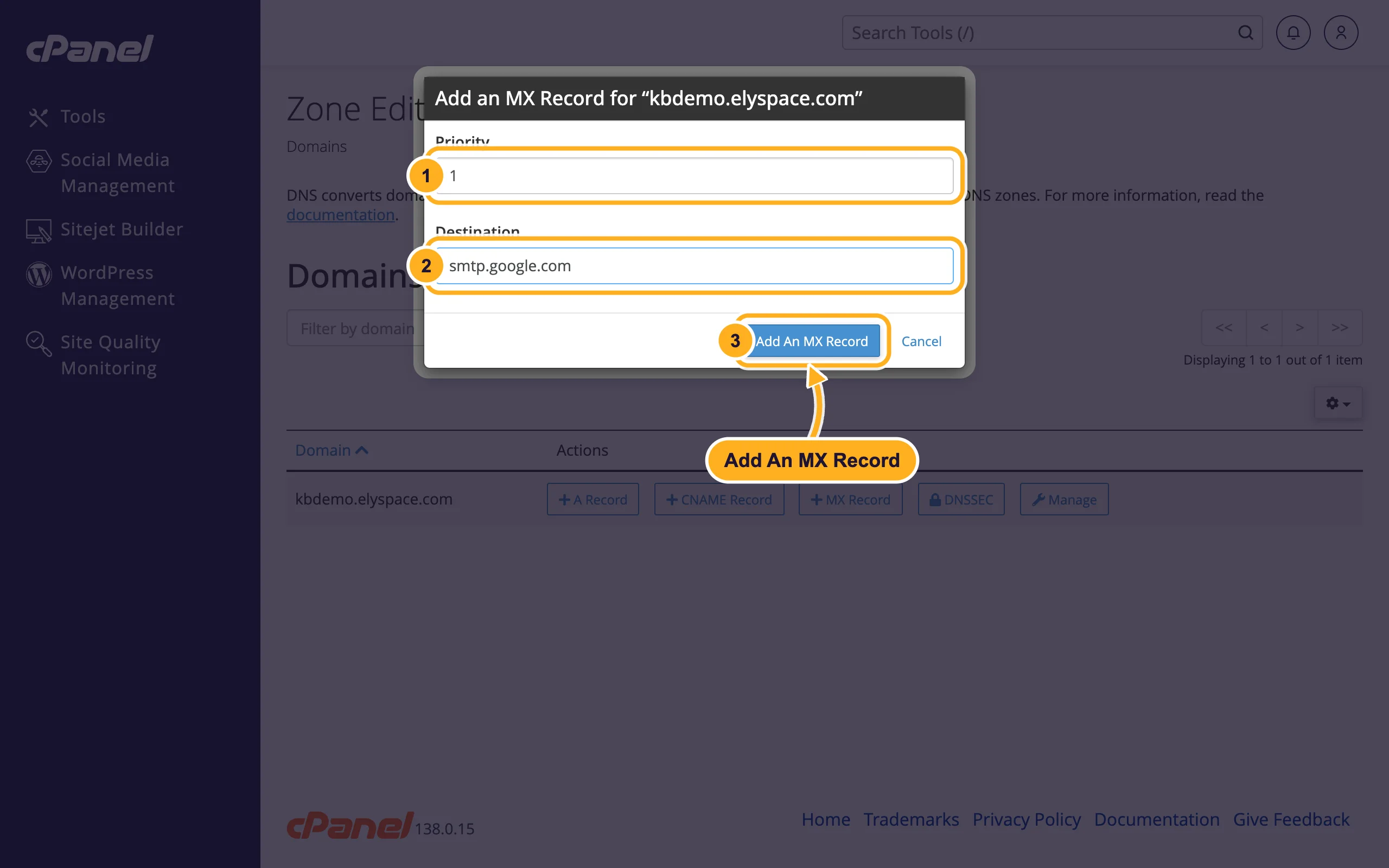
Go back to the domain list and click MX Record next to your domain. Fill in:
- Priority:
1 - Destination:
smtp.google.com - Click Add An MX Record.
- Priority:
smtp.google.com with priority 1 is the record Google gives for current Workspace setups. Older setups use five records (ASPMX.L.GOOGLE.COM with priority 1, ALT1.ASPMX.L.GOOGLE.COM and ALT2.ASPMX.L.GOOGLE.COM with 5, ALT3.ASPMX.L.GOOGLE.COM and ALT4.ASPMX.L.GOOGLE.COM with 10); they still work. Use what your Google Admin console shows. More about MX records: Add or change MX records.
2. Set Email Routing to remote
This tells our server that your mail is handled elsewhere. Without it, mail sent from your website or other accounts on the same server to your address would still land in the old cPanel mailbox.
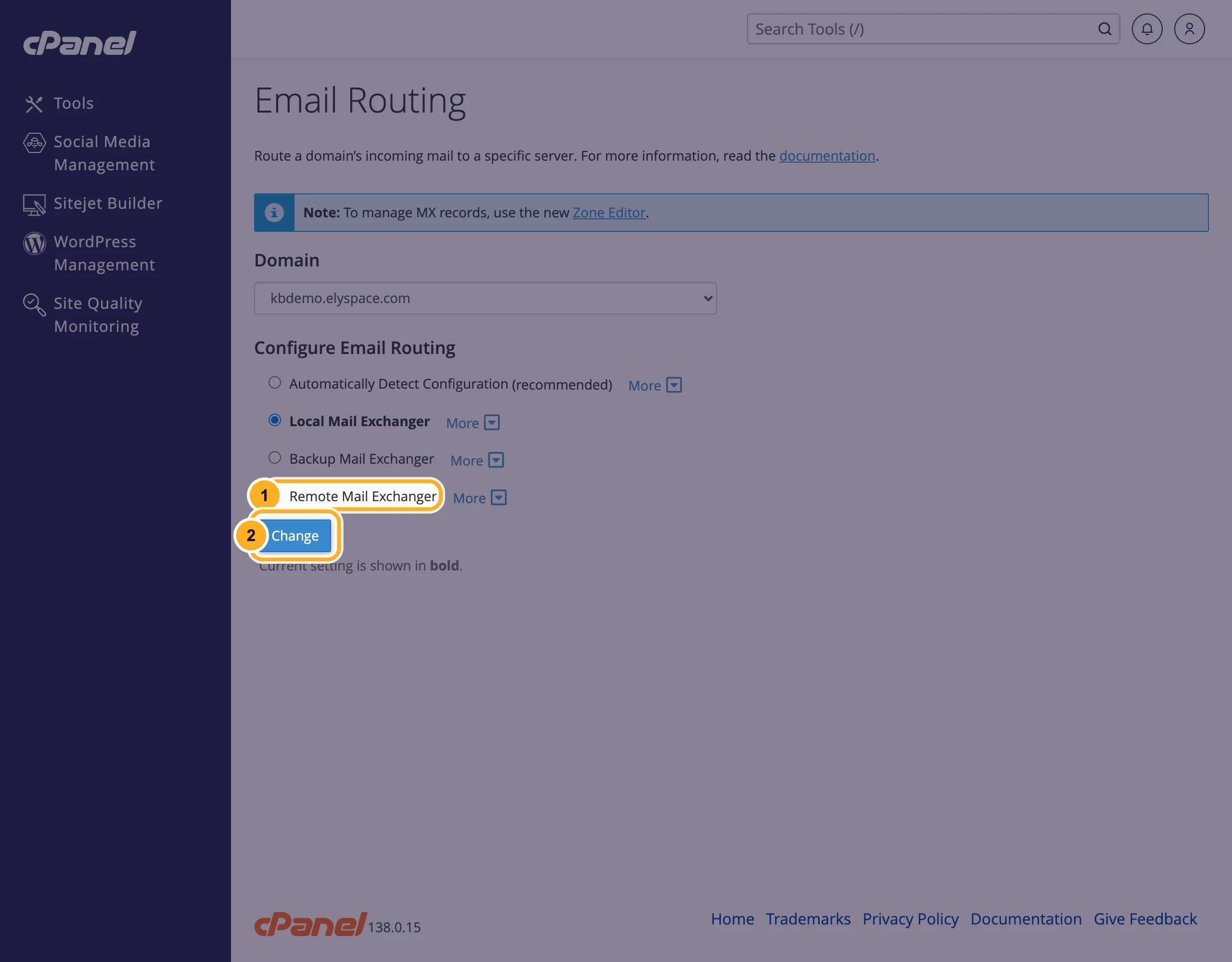
In cPanel, open Email Routing in the Email section and select your domain.
Select Remote Mail Exchanger and click Change. The current setting is shown in bold.
3. Update SPF and add Google's DKIM
In Zone Editor, Manage, edit the TXT record of your domain that starts with
v=spf1and addinclude:_spf.google.combefore~all, for examplev=spf1 +a +mx +ip4:37.187.131.23 include:_spf.google.com ~all. Keep the server's part (your own IP from cPanel) if your website sends mail. Don't create a second SPF record.Create Google's DKIM key in the Google Admin console and add it as a TXT record. The steps are in Fix email going to spam: SPF, DKIM and DMARC.
DNS changes usually take effect within minutes to a few hours. Then send a test message from another provider to your address and check that it arrives in Gmail.
Common problems
Mail still arrives in the old cPanel mailbox
Check that no MX record still points to your domain, and that Email Routing is set to Remote Mail Exchanger. Senders' servers may also remember the old MX for a few hours.
Your contact form's mail doesn't reach Google
Email Routing is still on local. Set it to Remote Mail Exchanger as in step 2.
Google says your MX records aren't set up
Your domain may not use our nameservers. Check them (see Change your domain's nameservers) and add the records wherever your DNS is managed.
Related articles
- Add or change MX records
- Fix email going to spam: SPF, DKIM and DMARC
- Edit DNS records in cPanel (A, CNAME, TXT)
- OX App Suite: point your domain's email DNS
Still stuck? Open a support ticket and we'll help.
