

Keep your own copy of important mail: copy whole folders to your computer with a mail app, or save single messages from webmail as .eml files.
Back up whole folders with Thunderbird
Thunderbird is free and keeps the copy in Local Folders on your computer, separate from the mailbox on the server.
Add the mailbox to Thunderbird (see Set up email in Thunderbird) and let it download your folders.
In the folder list, right-click Local Folders and create a new folder, for example
Backup 2026.Open a folder of the mailbox, for example Inbox, select all messages (Ctrl+A, on a Mac Cmd+A), right-click and choose Copy To, then your backup folder under Local Folders. Repeat for Sent and any other folder you want to keep.
Use Copy To, not Move To: moving would remove the mail from the server. Thunderbird's local folders are part of its profile folder; include that folder in your normal computer backup.
Save single messages from webmail
Log in to webmail (see Log in to webmail) and click the message.
Click More in the toolbar, then Export. Your browser downloads the message as an
.emlfile, with all attachments inside.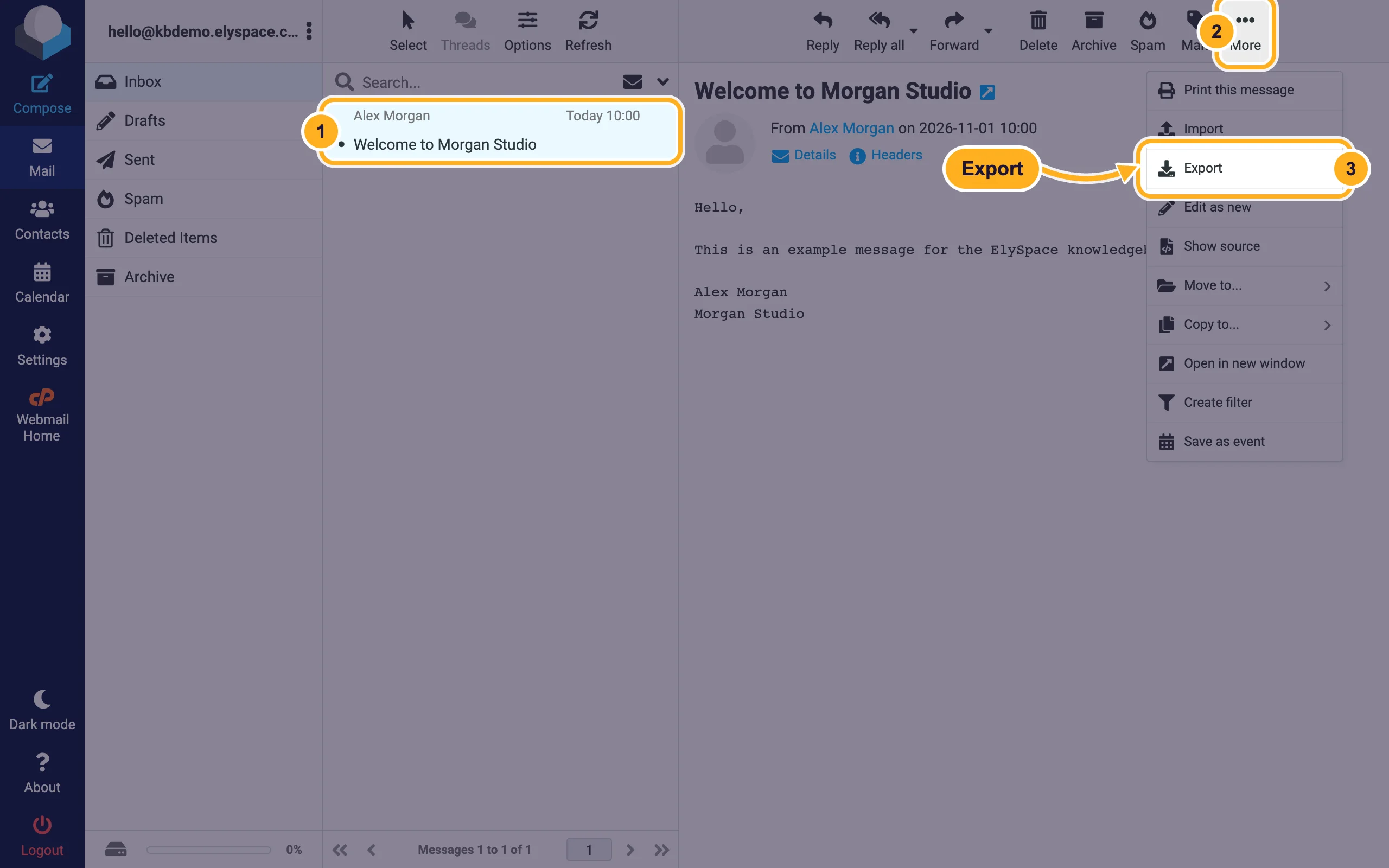
Most mail apps open .eml files directly (double-click). To put a saved message back into a mailbox, use More, Import in webmail (see Move your email from another provider).
Contacts and calendars
In webmail, Contacts has an Export button that saves your address book as a vCard (.vcf) file, and Calendar has an Export button for .ics files. Both can be imported again with the Import button next to it.
Common problems
I deleted mail by mistake
Look in the Deleted Items folder first; deleted messages usually go there. If it's not there, open a support ticket as soon as possible with the email address, the folder and roughly when the mail was deleted, and we'll check what can be done.
Mail disappears from the phone when I delete it in Outlook
That's how IMAP works: all devices show the same mailbox. Keep a copy in Thunderbird's Local Folders as described above.
The mailbox is full and I want to keep the old mail
Copy the old messages to Local Folders in Thunderbird, check the copy, then delete them on the server. See also Free up mailbox space (Email Disk Usage).
Related articles
- Set up email in Thunderbird
- Move your email from another provider to ElySpace
- Free up mailbox space (Email Disk Usage)
- Log in to webmail
Still stuck? Open a support ticket and we'll help.
