

We move your website from your old host to ElySpace for free. Order your hosting, then open a ticket in Website Migration Request and tell us what to move.
Before you start
- Order your hosting first. We need a hosting plan to move the site to. See Buy web hosting step by step. At the order step Domain, choose I already have a domain so your domain stays where it is for now.
- Keep your old hosting running until the move is finished and you've checked the new site. Don't cancel it early.
- Make your own backup of the website at your old host. Migration is a courtesy service, and every host stores data differently, so a backup protects you if something can't be moved.
Request the migration
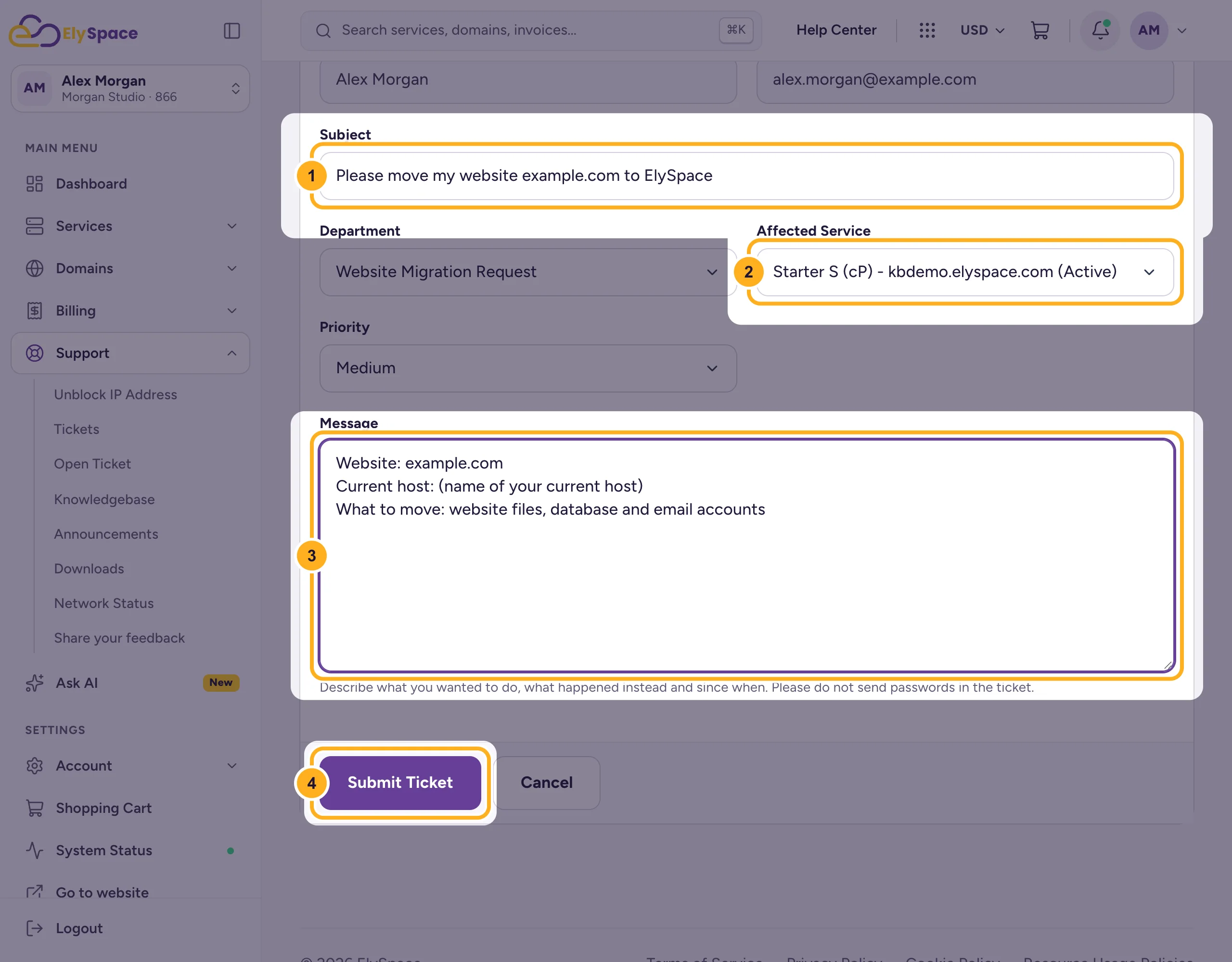
In the client area, go to Support > Open Ticket and choose the department Website Migration Request. Or open my.elyspace.com/submitticket.php.
Fill in the ticket:
- Subject: for example "Please move my website your-domain.com to ElySpace".
- Affected Service: choose the new hosting plan the site should move to.
- Message: the website address, the name of your current host, and what to move: website files, databases, email accounts.
- Click Submit Ticket.
Our migration team replies in the ticket and tells you what they need from you to get access to your old hosting.
Several websites, or not sure what to include? Mention it in the ticket, or talk to us first in the live chat on elyspace.com or on WhatsApp at +91 6005734534.
After the move
- We tell you in the ticket when your site has been copied.
- Check the site and your email on the new hosting. Tell us in the ticket if anything is missing.
- Point your domain to ElySpace by changing its nameservers at your domain provider. You'll find the nameservers on your service page in the client area: Find your server name, IP address and nameservers.
- When the domain shows the site from ElySpace and your email works, you can cancel the old hosting.
Changing the nameservers last means your site stays online at the old host during the whole move.
Common problems
Your old host doesn't use cPanel
That's fine. Tell us which control panel or website software your old host uses. In rare cases data is stored in a format that can't be moved; we'll tell you if that happens.
Emails go missing after the switch
Emails sent while the nameservers change can still arrive at the old host for a few hours. Keep the old mailbox until the change is complete, and check it once more before you cancel.
Related articles
- Buy web hosting step by step
- Open a support ticket
- Transfer a domain to ElySpace
- Get your first website online: quick start
Still stuck? Open a support ticket and we'll help.
