

To move a domain to ElySpace, turn off its transfer lock at your current provider, get its auth code (EPP code) and order the transfer in our client area.
Before you start
- Turn off the transfer lock at your current provider (also called registrar lock or domain lock).
- Get the auth code, also called EPP code or transfer code. Your current provider shows it in the domain settings or sends it by email.
- Check the owner's email address. Approval emails for the transfer go there.
- Wait 60 days after a registration or a previous transfer. Under ICANN rules, most domains can't move within 60 days of either.
- Don't wait until the last days before expiry. Start well before the expiry date so the domain doesn't run out during the transfer.
Order the transfer
Open Transfer a Domain. When you're logged in, you also find Transfer a domain at the top of My Domains.
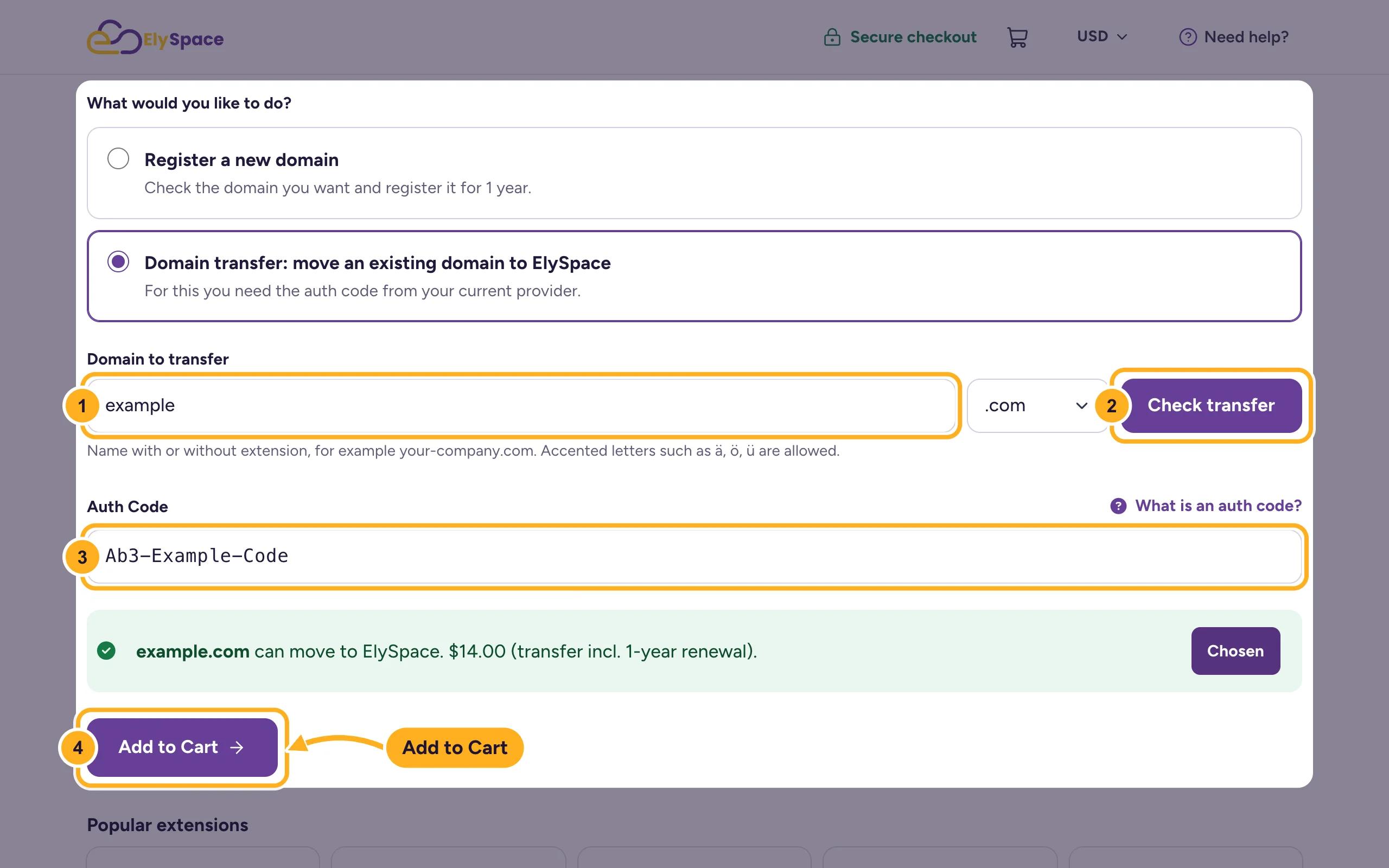
With Domain transfer: move an existing domain to ElySpace selected:
- Type your domain in Domain to transfer.
- Click Check transfer. You see whether the domain can move and what the transfer costs. The price includes one year's renewal.
- Paste the code from your current provider into Auth Code.
- Click Add to Cart.
On Domains Configuration, check the auth code and the nameservers. Keep our nameservers if the website and email will be hosted with us. If they stay at another service for now, enter that service's nameservers so nothing changes during the move.
Click Continue and complete the checkout (see Buy web hosting step by step). We start the transfer once the invoice is paid.
After the order
- Watch the owner's mailbox and approve the transfer if you get an email from your current provider or the registry.
- While the domain moves, it shows under My Domains in the Transfers tab.
- When it's done, the domain is listed as active, with the new expiry date. Check its nameservers and auto-renew (see Manage your domains in the client area).
Common problems
"is not registered yet, so it cannot be transferred"
Check the spelling. If the domain really isn't registered, the page offers to register it instead.
"Transfer of .xx is not offered yet"
We don't accept transfers of that extension through the order form. Open a ticket in Domains Support.
The transfer is rejected
The most common reasons: the domain is still locked, the auth code is wrong or expired (ask your provider for a new one and enter it exactly, it's case-sensitive), or the domain was registered or transferred less than 60 days ago. Open a ticket with the domain name and we'll check what the registry says.
.uk domains
.uk domains don't use an auth code. Ask your current provider to change the domain's IPS tag to ours. Open a ticket in Domains Support first and we'll tell you the tag.
Related articles
- Point a domain from GoDaddy or another registrar
- Register a new domain
- Move your website to ElySpace (free migration)
Still stuck? Open a support ticket and we'll help.
