

For OX App Suite email, point your domain's MX records to the four OX mail servers and add the OX SPF record. In cPanel you do this in the Zone Editor.
The records you need
| Type | Name | Priority | Value |
|---|---|---|---|
| MX | your domain (@) | 10 | mx001.cloudus.rs.oxcs.net |
| MX | your domain (@) | 10 | mx002.cloudus.rs.oxcs.net |
| MX | your domain (@) | 10 | mx003.cloudus.rs.oxcs.net |
| MX | your domain (@) | 10 | mx004.cloudus.rs.oxcs.net |
| TXT (SPF) | your domain (@) | - | v=spf1 include:spf.cloudus.rs.oxcs.net ~all |
All four MX records have the same priority. Add all of them, so mail still arrives when one OX server is busy.
Add the MX records in cPanel
This works when your domain uses the ElySpace nameservers. If your DNS is managed elsewhere, add the same records there.
Log in to cPanel (see Log in to cPanel from the client area) and open Zone Editor.
Click Manage next to your domain, filter by MX, and delete any MX record that doesn't point to an OX server (usually the one pointing to your own domain).
Go back to the domain list and click MX Record next to your domain. Enter Priority
10and Destinationmx001.cloudus.rs.oxcs.net, then click Add An MX Record.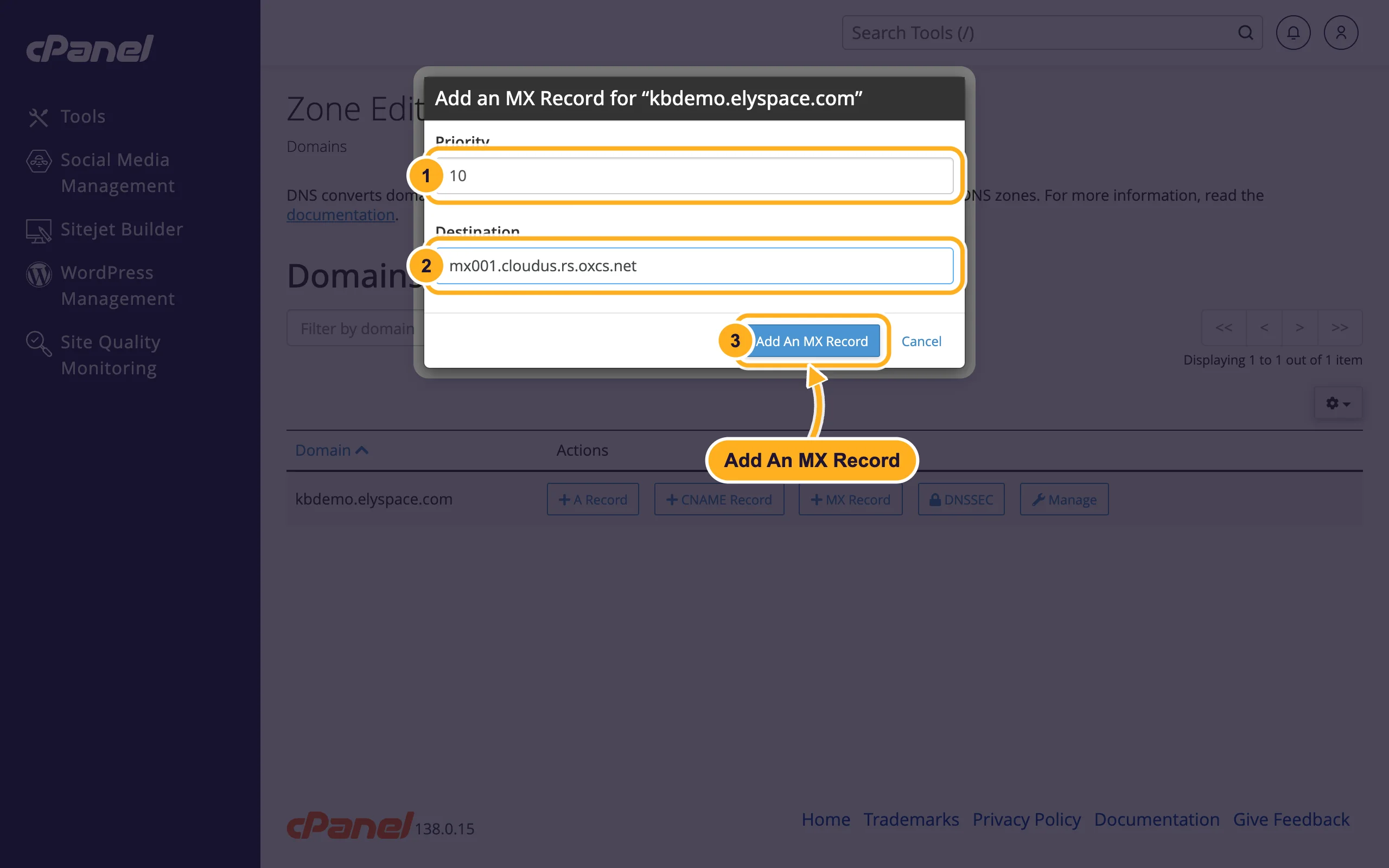
Repeat for
mx002,mx003andmx004.
Update SPF and Email Routing
In Zone Editor, Manage, edit the TXT record of your domain that starts with
v=spf1. A domain may only have one SPF record, so addinclude:spf.cloudus.rs.oxcs.netto the existing one, for examplev=spf1 +a +mx +ip4:37.187.131.23 include:spf.cloudus.rs.oxcs.net ~all(keep your own server IP from cPanel if your website sends mail). If there is no SPF record, add a TXT record withv=spf1 include:spf.cloudus.rs.oxcs.net ~all.Open Email Routing, select your domain, choose Remote Mail Exchanger and click Change. Then mail from your website to your own address goes to OX too (screenshots in Use Google Workspace with your domain, step 2).
DNS changes usually work within minutes to a few hours. Send a test message from another provider to check that it arrives in OX App Suite.
Common problems
Mail still arrives in the cPanel mailbox
An old MX record pointing to your domain is still there, or Email Routing is still set to local. Check both.
Mail from OX lands in spam
The SPF record is missing the OX include, or there are two SPF records. Merge them into one (see Fix email going to spam: SPF, DKIM and DMARC).
Related articles
- Add or change MX records
- Fix email going to spam: SPF, DKIM and DMARC
- Use Google Workspace with your domain
- Edit DNS records in cPanel (A, CNAME, TXT)
Still stuck? Open a support ticket and we'll help.
