

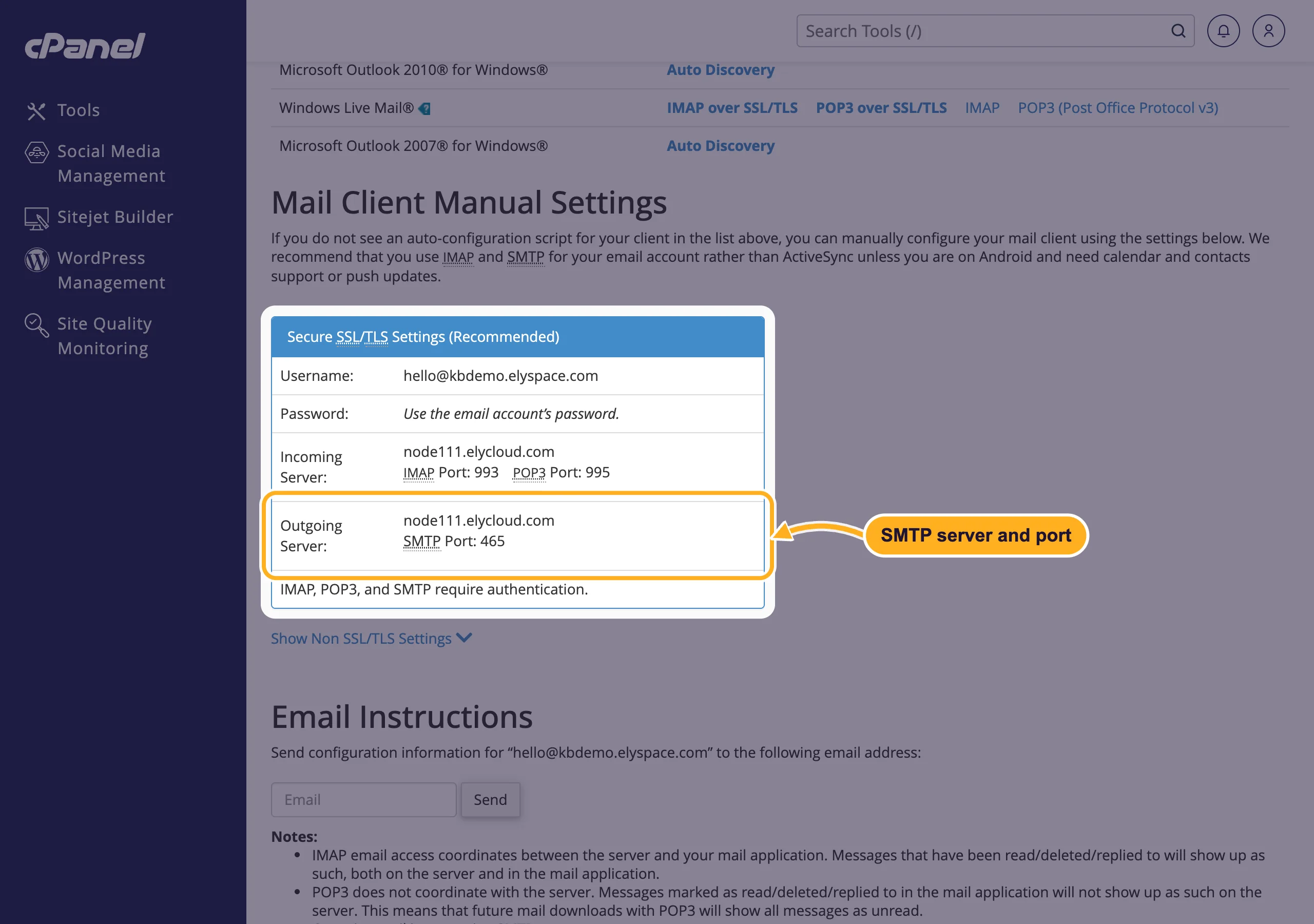
Let your website or app send email by logging in to a mailbox over SMTP: your server name, port 465 with SSL/TLS, full email address and its password.
The SMTP settings
| Setting | Value |
|---|---|
| SMTP host | your server name, for example node111.elycloud.com |
| Port and encryption | 465 with SSL/TLS (sometimes called "SMTPS" or "ssl"), or 587 with STARTTLS (sometimes called "tls") |
| Authentication | on (login required) |
| Username | the full email address, for example [email protected] |
| Password | the password of that mailbox |
| From address | the same email address you log in with |
Your server name is shown in cPanel: open Email Accounts, click Connect Devices next to the address and look at Outgoing Server (see Email server settings and ports).
Set it up
Create a mailbox for the website, for example
[email protected]or[email protected](see Create an email account). A separate mailbox means you can change its password without touching your own mail.Open the mail settings of your website, shop or app. Most systems have fields named like the ones in the table above. In WordPress you need a plugin for this: see Send WordPress email through SMTP.
Enter the host, port, encryption, username and password. Set the From address to the same mailbox.
Send a test message to an address outside your domain (for example your personal Gmail) and check that it arrives, also in the spam folder.
Example: PHP with PHPMailer
If you write your own PHP code, the free PHPMailer library handles SMTP for you. Replace the example values with your own:
use PHPMailer\PHPMailer\PHPMailer;

$mail = new PHPMailer(true);
$mail->isSMTP();
$mail->Host       = 'node111.elycloud.com';   // your server name
$mail->SMTPAuth   = true;
$mail->Username   = '[email protected]';
$mail->Password   = 'the mailbox password';
$mail->SMTPSecure = PHPMailer::ENCRYPTION_SMTPS; // port 465, SSL/TLS
$mail->Port       = 465;

$mail->setFrom('[email protected]', 'Your Website');
$mail->addAddress('[email protected]');
$mail->addReplyTo('[email protected]');
$mail->Subject = 'Your order';
$mail->Body    = 'Thank you for your order.';
$mail->send();
For port 587 use PHPMailer::ENCRYPTION_STARTTLS and 587 instead. Keep the password in a configuration file outside public_html where you can, never in a file visitors can download.
Good to know
- Use your ElySpace mailbox, not Gmail or Outlook.com. On our hosting, a website can't reach outside mail servers such as smtp.gmail.com: the connection ends at our own mail server, so the login fails. Send through a mailbox on your hosting account instead.
- Keep the From address on your domain. If a form should let you reply to the visitor, put the visitor's address in Reply-To, not in From. See Contact form emails not arriving? Fix it with SMTP.
- No bulk mail. Our mail server doesn't allow unsolicited or bulk email. For newsletters to large lists, use a newsletter service.
- Size: the server accepts messages up to 50 MB, attachments included.
Common problems
"Authentication failed" or "535 Incorrect authentication data"
Use the full email address as username and check the password in webmail. If you're not sure about it, set a new one (see Change an email account password) and enter it in the website too.
Certificate errors ("peer certificate", "SSL routines")
Use your server name as host, not localhost or mail.yourdomain.com. The server's certificate is issued for its own name, so only that name passes the check.
The connection times out
Check that the port and the encryption belong together: 465 with SSL/TLS, 587 with STARTTLS. Mixing them (for example 465 with STARTTLS) makes the connection fail or hang.
Mail is sent but lands in spam
Make sure the From address is the mailbox you log in with, and set up SPF, DKIM and DMARC for your domain (see Fix email going to spam: SPF, DKIM and DMARC). To see what happened to a message, use Track Delivery.
Related articles
- Send WordPress email through SMTP
- Contact form emails not arriving? Fix it with SMTP
- Email server settings and ports (IMAP, POP3, SMTP)
- Mailbox full, bounces and other common email errors
Still stuck? Open a support ticket and we'll help.
