

Tell us what works and what we should do better under Support > Share your feedback in the client area. Only the ElySpace team sees it.
Send feedback
Log in to the client area and click Support > Share your feedback. (Leave feedback on the dashboard opens it too.)
Fill in How are we doing?:
- Your overall rating: click 1 star (very poor) to 5 stars (excellent).
- Category: what the feedback is about, for example Support, Billing, Control panel or Feature idea.
- What is it about?: optional, pick a service, domain or ticket.
- Your message: optional, plain text. Don't include passwords.
- Click Send feedback.
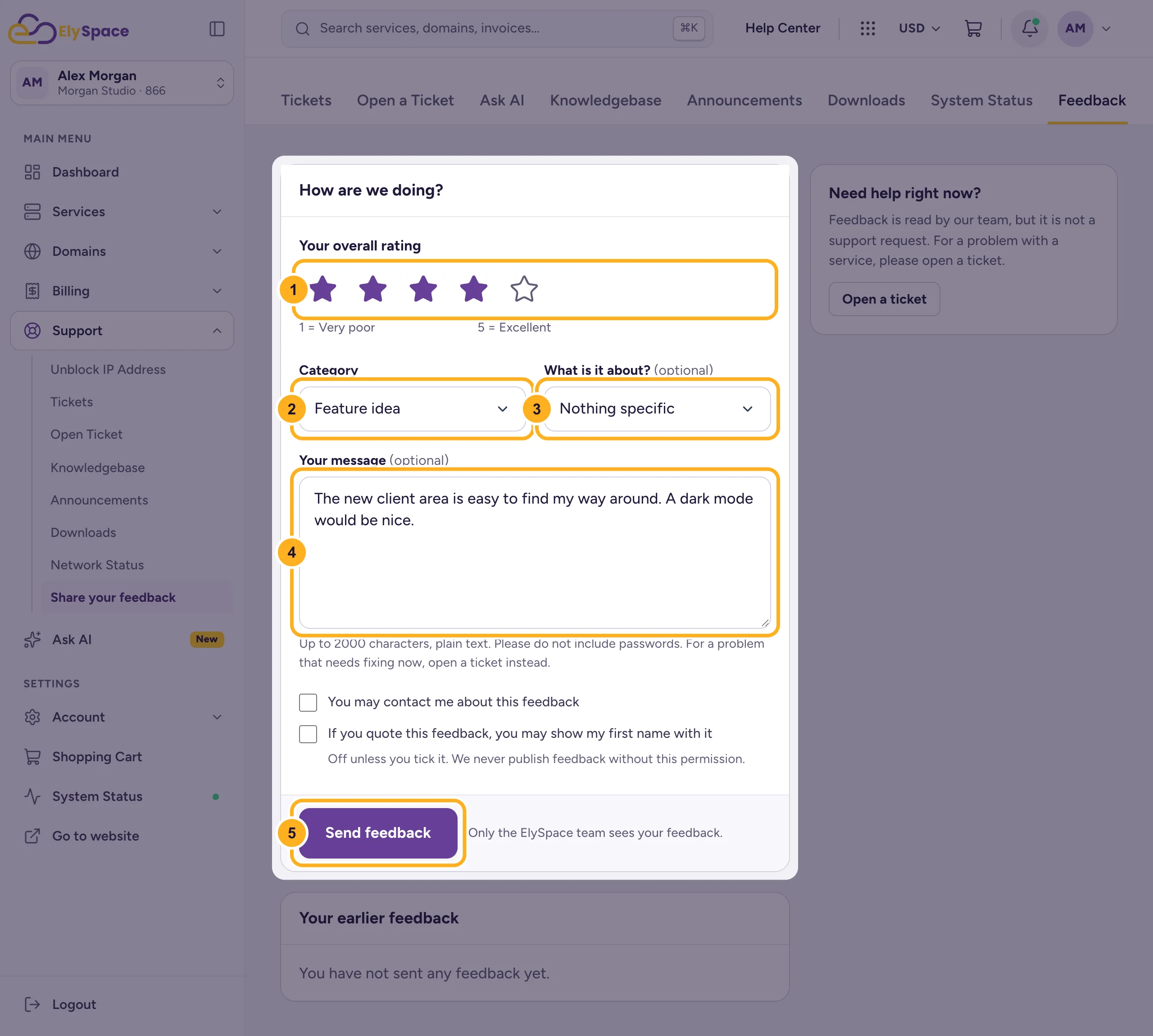
Two boxes are off unless you tick them: You may contact me about this feedback, and If you quote this feedback, you may show my first name with it. We never publish feedback without that permission. What you've sent is listed under Your earlier feedback.
Feedback or ticket?
Feedback is read by our team, but it isn't a support request. If something needs fixing now, open a ticket instead.
Common problems
"Please check the highlighted fields"
Choose a star rating and a Category; both are needed.
Related articles
- Open a support ticket
- View and reply to your tickets
- Contact ElySpace: chat, phone, WhatsApp and email
Still stuck? Open a support ticket and we'll help.
