

Your ElySpace website is already compressed with Gzip or Brotli. You can check it in your browser, and set it explicitly in cPanel's Optimize Website.
Check that your site is compressed
Open your website in Chrome, Edge or Firefox, press F12 to open the developer tools and click the Network tab.
Reload the page with F5 and click the first entry (your page).
Under Response Headers, look for content-encoding.
brmeans Brotli,gzipmeans Gzip. Both are compressed. If the line is missing, that file was sent uncompressed (very small files are often sent as they are).
Online speed tests that warn "Enable text compression" usually test a file that isn't on your hosting, such as a script from another service. Check which address the warning lists.
Turn on compression in Optimize Website
If a plugin, a speed test or a developer asks for the cPanel setting to be on, you can switch it on. It adds compression rules for your whole account.
Log in to cPanel and click Optimize Website in the Software section.
Under Compress Content:
- Choose Compress All Content. To compress only some file types, choose Compress the specified MIME types. and edit the list in MIME Types instead.
- Click Update Settings. cPanel confirms Content compression is now enabled.
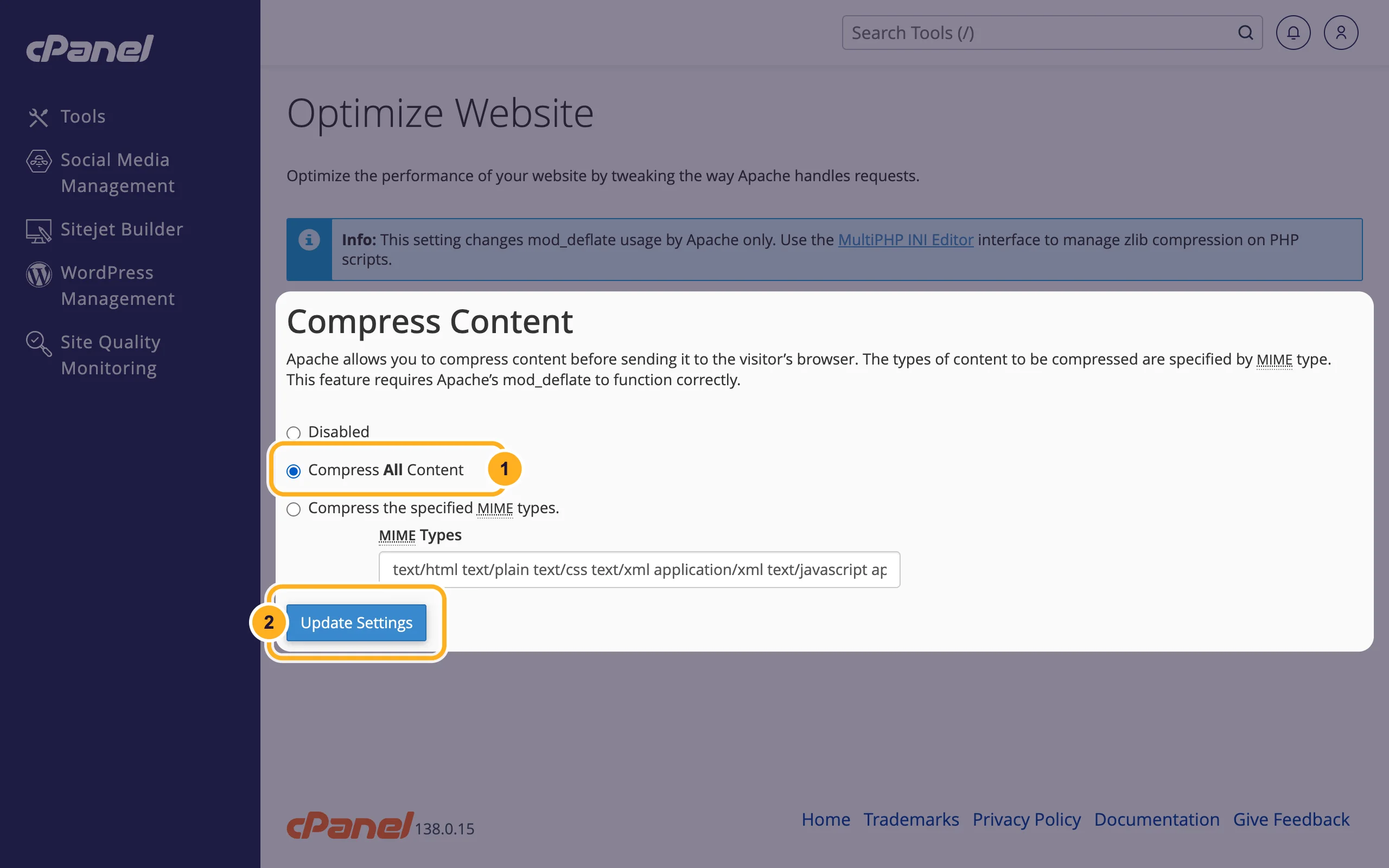
To undo it, choose Disabled and click Update Settings again. Your site stays compressed by the server either way.
The note at the top of the page mentions zlib.output_compression in the MultiPHP INI Editor. Leave it Disabled: the server already compresses pages, and compressing twice can break them.
Common problems
The page shows strange characters after a change
Something compresses the page twice, usually a caching or speed plugin together with zlib.output_compression. Turn off the compression option in the plugin, set zlib.output_compression back to Disabled and clear the cache.
The speed test still says text compression is missing
Run the test again after clearing your site's cache. If it still complains, look at the file addresses in the report: files from other domains (fonts, chat widgets, ad scripts) are compressed, or not, by those services.
Related articles
- Change the PHP version and PHP settings
- Secure your WordPress site from cPanel
- cPanel at a glance: the most-used tools
Still stuck? Open a support ticket and we'll help.
